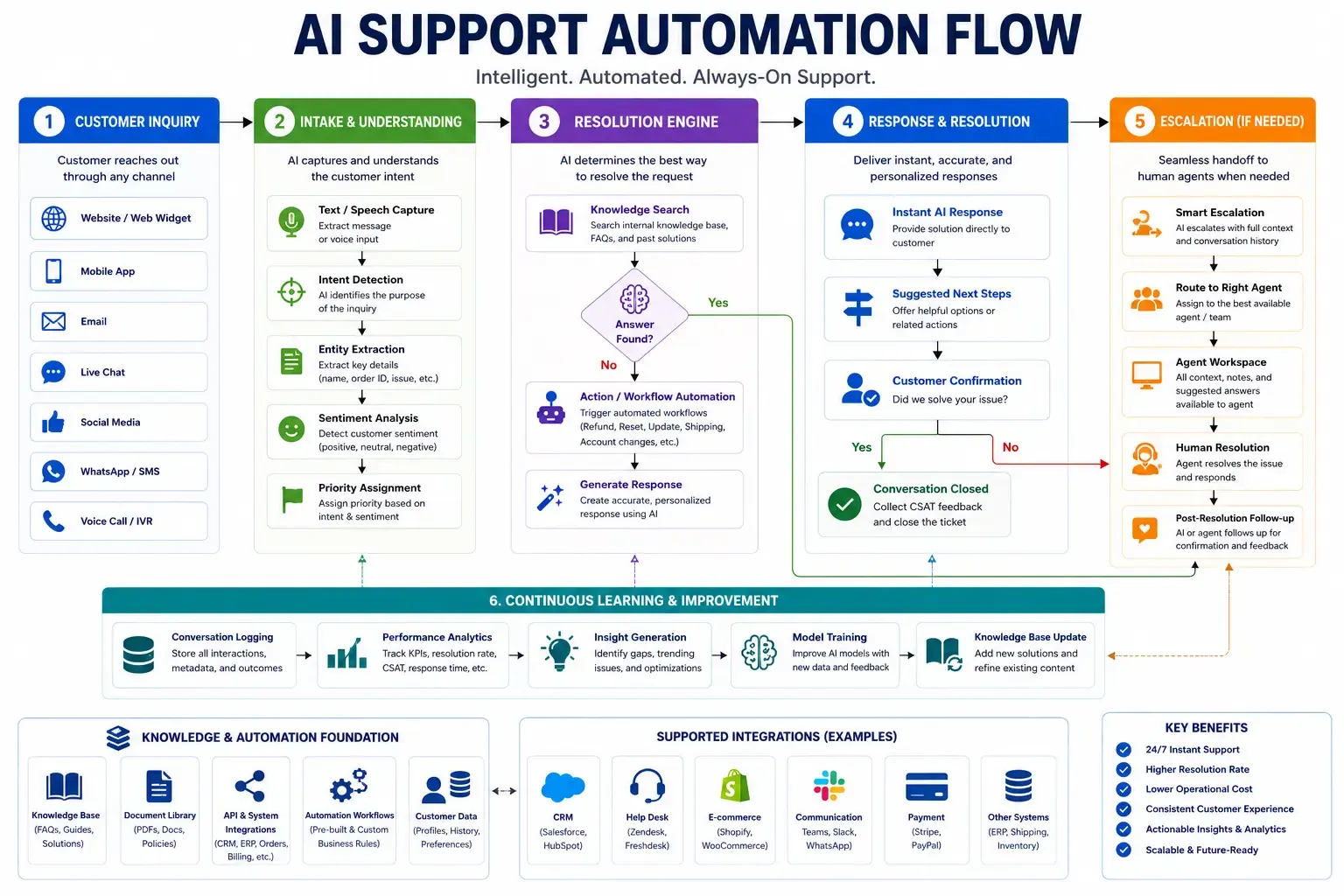
An enterprise chatbot is a conversational AI system built to run across an entire organization, not one team's website widget. It handles thousands of simultaneous conversations, pulls its answers from a company's live CRM, ticketing system, and internal documentation instead of a static script, and hands off to a human agent the moment a conversation gets too complex or too sensitive to finish on its own.
That mix of scale, real data access, and a defined escalation path is what separates an enterprise chatbot from the free-tier widget most software vendors bundle into their pricing page. A widget can answer "what are your hours." An enterprise chatbot can look up an actual invoice, check a real order status, or pull a candidate's interview stage from an applicant tracking system, because it is connected to the systems that hold that information.
That consistency has to hold across channels too. A real enterprise chatbot behaves the same way whether the conversation starts on a website chat window, inside a mobile app, in Slack, or over a phone call routed through a voice interface, because it draws from the same retrieval layer and the same escalation rules no matter where the message came in.
This guide covers what an enterprise chatbot platform needs to include, what enterprise chatbot development costs and takes in 2026, how to decide between a SaaS tool and a custom build, and how XOVO Technologies architects these systems for clients across the United States, UAE, and Saudi Arabia. If you're evaluating a chatbot for enterprises right now, use this as the checklist to hold any vendor's proposal against.
How Is an Enterprise Chatbot Different From a Standard Chatbot Widget?
A standard chatbot widget answers a handful of FAQs from a fixed script and refers anything harder to an email form. An enterprise chatbot platform retrieves answers from a company's actual, current data, connects into the CRM, helpdesk, and internal systems that data lives in, and routes uncertain or high-stakes conversations to a person automatically, with full context attached.
The difference shows up in three places: what the bot can access, who is allowed to see what it says, and what happens when it gets something wrong. A widget typically has no permission model at all; every visitor gets the same canned answers from the same document set. An enterprise chatbot enforces role-based access, so a customer-facing instance never surfaces internal pricing sheets and an HR instance never leaks into a public channel. XOVO Technologies builds this access control into every deployment of its AI Chatbot product by default, not as a paid add-on bolted on later.
Reporting is the other gap that rarely shows up in a vendor demo. An enterprise chatbot needs conversation-level analytics that break down resolution rate, escalation rate, and topic trends by team, not just a running total of conversations handled. Support and sales leads use that breakdown to spot where the knowledge base is thin and where the bot is escalating questions it should be able to answer on its own.
What Should an Enterprise Chatbot Platform Actually Include?
At minimum, an enterprise chatbot platform needs retrieval-augmented generation over your own data, integrations with the systems your team already runs, role-based access control, full conversation logging for audit, and a human-in-the-loop escalation path. Skip any one of these and the bot either answers confidently with wrong information or can't do enough to justify the deployment.
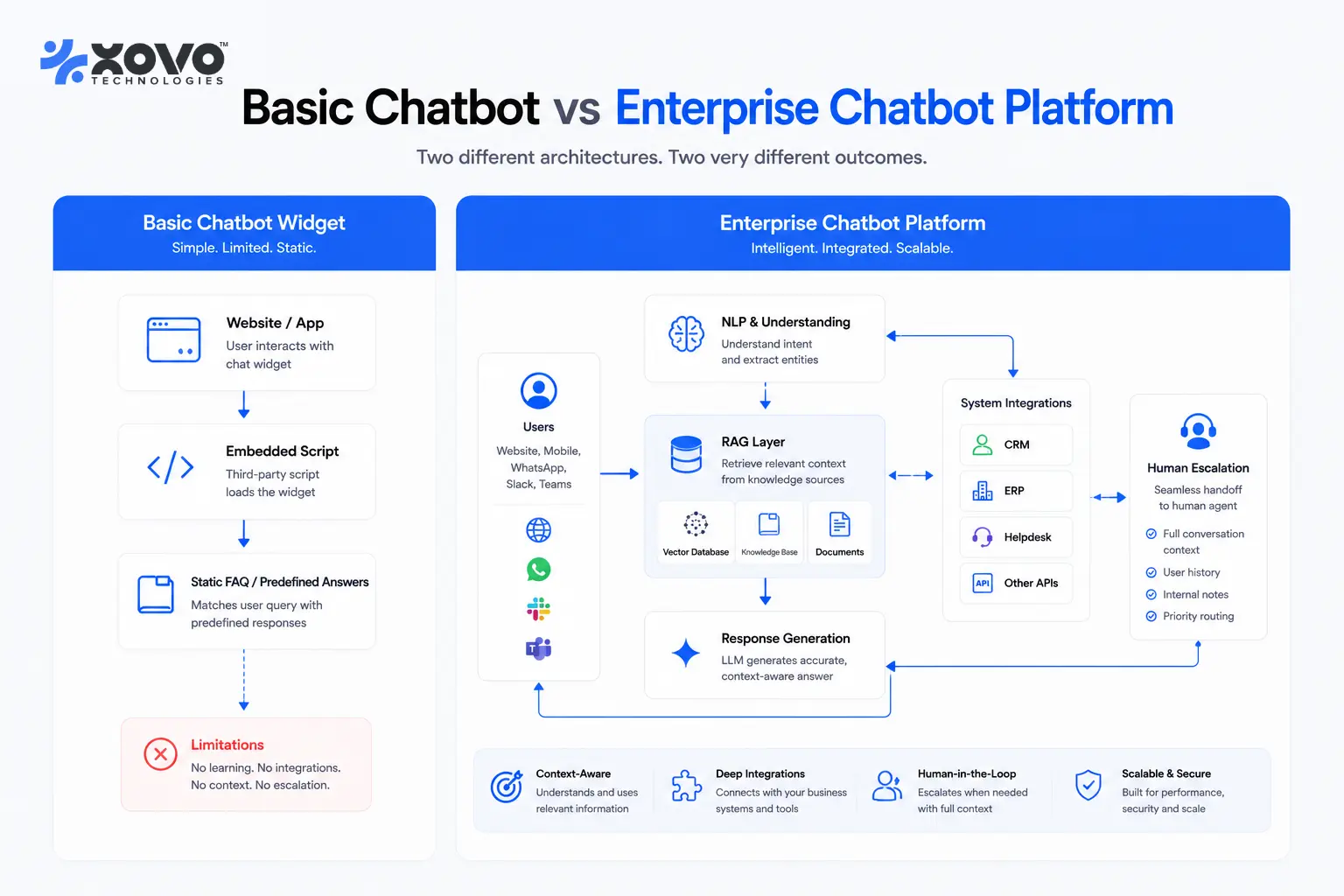
| Capability | Basic chatbot widget | Enterprise chatbot platform |
|---|---|---|
| Knowledge source | Static FAQ script or a single PDF | Retrieval-augmented generation over live CRM, docs, ticketing, and product data |
| System integrations | None, or one webhook | 50+ pre-built integrations across CRM, ERP, helpdesk, and messaging tools |
| Data isolation | Single shared instance for everyone | Role-based access, tenant isolation, and a private or air-gapped hosting option |
| Escalation | A generic "contact us" link | Human-in-the-loop handoff with full conversation context attached |
| Model choice | Fixed, vendor-locked | GPT-5.5, Claude Opus 4.7, Gemini 3.1 Pro, or open-weight models, by workload |
| Ownership | Vendor holds the code and the data | Client owns the source code and the model weights |
Ownership is the row buyers underweight most during evaluation. A chatbot vendor that owns your workflows and conversation data can raise prices, change its terms, or shut down its API with a notice period measured in weeks, and a company that built years of escalation logic on top of that vendor has no way to move fast when that happens. Owning the source code and the model weights means the escalation rules, the integrations, and the conversation history stay under the client's control no matter what happens to any single AI vendor.
Model choice matters more than most vendors admit. Reasoning-heavy conversations, like a customer disputing a contract term, need a strong general model such as GPT-5.5, Claude Opus 4.7, or Gemini 3.1 Pro. High-volume, low-complexity traffic, like password resets or order status checks, can run on an open-weight model such as Llama 4 or Mistral for a fraction of the cost. A well-built enterprise chatbot platform routes between them automatically instead of forcing every message through the most expensive model available. For a deeper walkthrough of how these pieces fit together, see our enterprise conversational AI architecture guide.
How Much Does Enterprise Chatbot Development Cost?
The cost of enterprise chatbot development is driven far more by the number of systems it connects to than by the chatbot itself. A single-channel bot answering from one knowledge base is a modest build. A bot that reads from a CRM, writes back to a ticketing system, checks inventory in an ERP, and posts into Slack is a materially larger integration project, and the integration work is usually where the budget goes.
Three variables move the price the most: the number and complexity of system integrations, whether the deployment needs private or air-gapped hosting for regulated data, and whether the client wants ongoing managed MLOps and 24/7 support after launch. In our engagements, teams that skip ongoing support tend to come back within months once the bot's answers start drifting, because a chatbot wired into live enterprise data needs monitoring and retraining on a regular cadence, not a single deployment and a handshake.
Deployment size moves the price too. A single channel connected to one or two systems is a modest project. A rollout that spans a CRM, an ERP, and a ticketing system for several departments at once is a materially bigger scope, and it should be priced that way. The useful habit when comparing vendor quotes is checking exactly which systems each number actually includes, since a lower quote that leaves out half the integrations you need isn't a lower price at all once you add the missing work back in.
XOVO Technologies prices its chatbot building and integration work around these three variables, scoped after a working session with the client's engineering and support teams, not off a generic rate card.
Build, Buy, or Customize: Which Approach Fits a Chatbot for Enterprises?
Most companies choose between three paths: a SaaS chatbot tool configured out of the box, a fully custom build from scratch, or a customized platform built on proven frameworks with the client owning the code. Each trades speed against control differently, and the right choice depends on how much the chatbot needs to touch systems no off-the-shelf tool was built to reach.
| Factor | SaaS chatbot tool | Fully custom build | Customized platform (XOVO's approach) |
|---|---|---|---|
| Time to first version | Days | Months | Weeks |
| Integration depth | Limited to the vendor's marketplace | Whatever the in-house team builds | 50+ pre-built integrations plus custom connectors |
| Code and model ownership | Vendor owns it; you rent access | Client owns everything | Client owns the source code and model weights |
| Escalation logic | Often generic, sometimes missing | Whatever the team designs | Human-in-the-loop by default on every agent |
| Best fit | Low-stakes, simple support volume | Companies with a large in-house AI team | Enterprise integration depth without hiring a full AI team |
The middle path is worth naming directly, because it's the one most enterprise buyers actually pick once they've compared the other two. It delivers the integration depth and data ownership of a custom build without the long hiring process a from-scratch team requires.
Switching later carries a real cost too. Moving off a SaaS chatbot tool usually means rebuilding every integration and retraining staff on a new interface, because the workflows and conversation history live inside a platform the vendor controls. Companies that expect to grow past a single department typically start with a platform built to extend, since building integration depth once tends to cost less than migrating a chatbot's workflows a second time.
How Long Does It Take to Deploy an Enterprise AI Chatbot Platform?
In our engagements, a working enterprise AI chatbot platform pilot typically takes 6 to 10 weeks from kickoff, and a full production rollout across every planned channel and integration usually lands between 3 and 5 months, depending on how many systems it needs to connect to and whether the data requires private or air-gapped hosting.
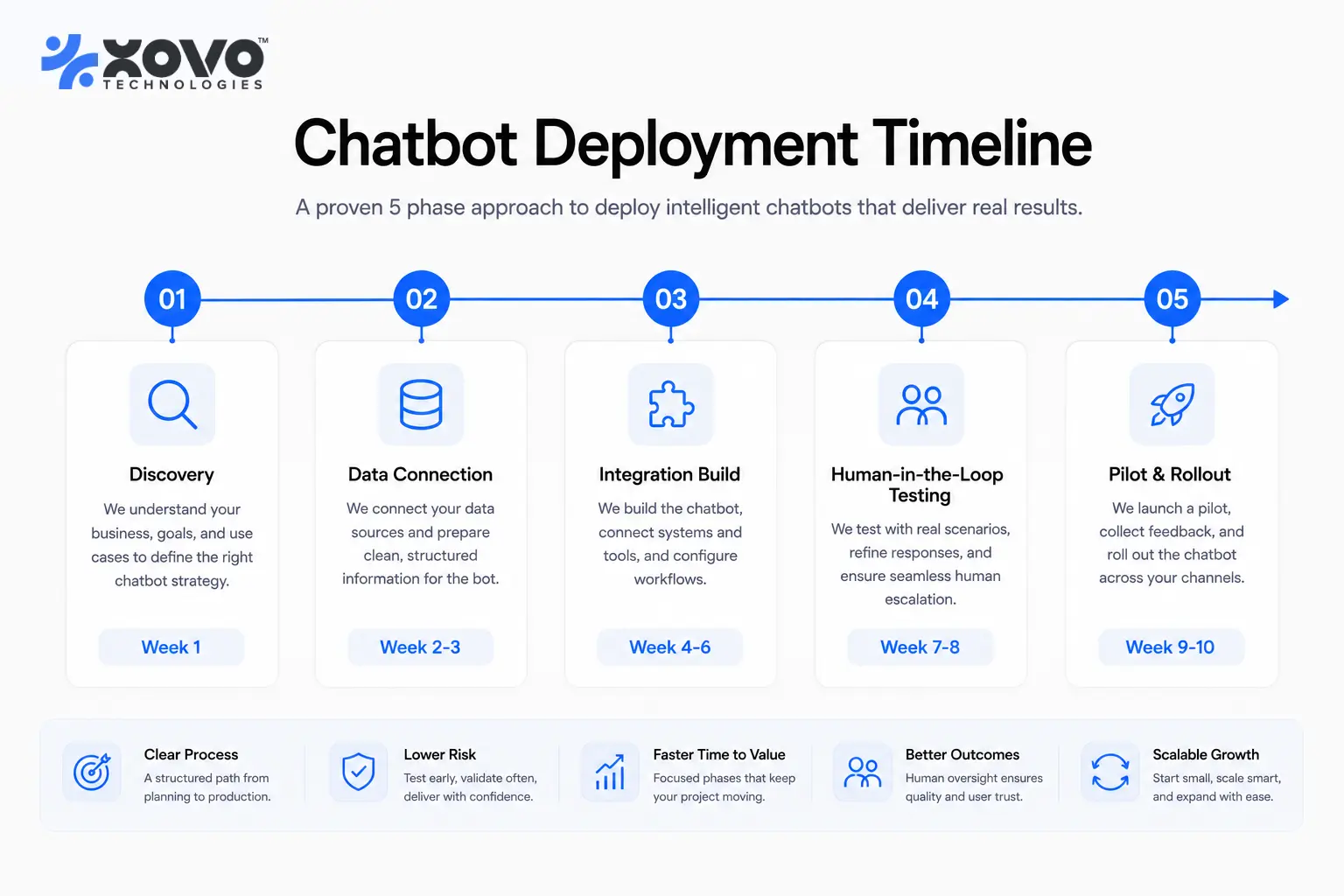
A typical build moves through five phases:
- Discovery and scoping (1-2 weeks): mapping use cases, data sources, and escalation rules with the client's support and engineering leads.
- Data connection and retrieval setup (2-3 weeks): connecting the model to live CRM, ticketing, and knowledge base data through APIs or MCP.
- Integration build (2-4 weeks): wiring the bot into the systems it needs to read from and write to.
- Human-in-the-loop testing (1-2 weeks): running real conversations past support staff before anything goes live to a customer.
- Pilot and rollout (2-4 weeks): launching to one channel or team, then expanding once escalation rates and resolution numbers hold up.
Compliance review is the most common reason a timeline slips past these ranges. A deployment that needs private or air-gapped hosting, or a security sign-off from a regulated industry's compliance team, typically adds two to four weeks on top of the phases above, and most of that time goes to the client's own approval process rather than the engineering work itself.
Which Systems Does an Enterprise Chatbot Need to Connect To?
An enterprise chatbot needs to reach whatever system holds the answer a customer or employee is actually asking for: order status lives in the ERP, ticket history lives in the helpdesk, and account details live in the CRM. A chatbot that can only read from a document library will always fall back to "let me connect you with someone" for exactly the questions people ask most.
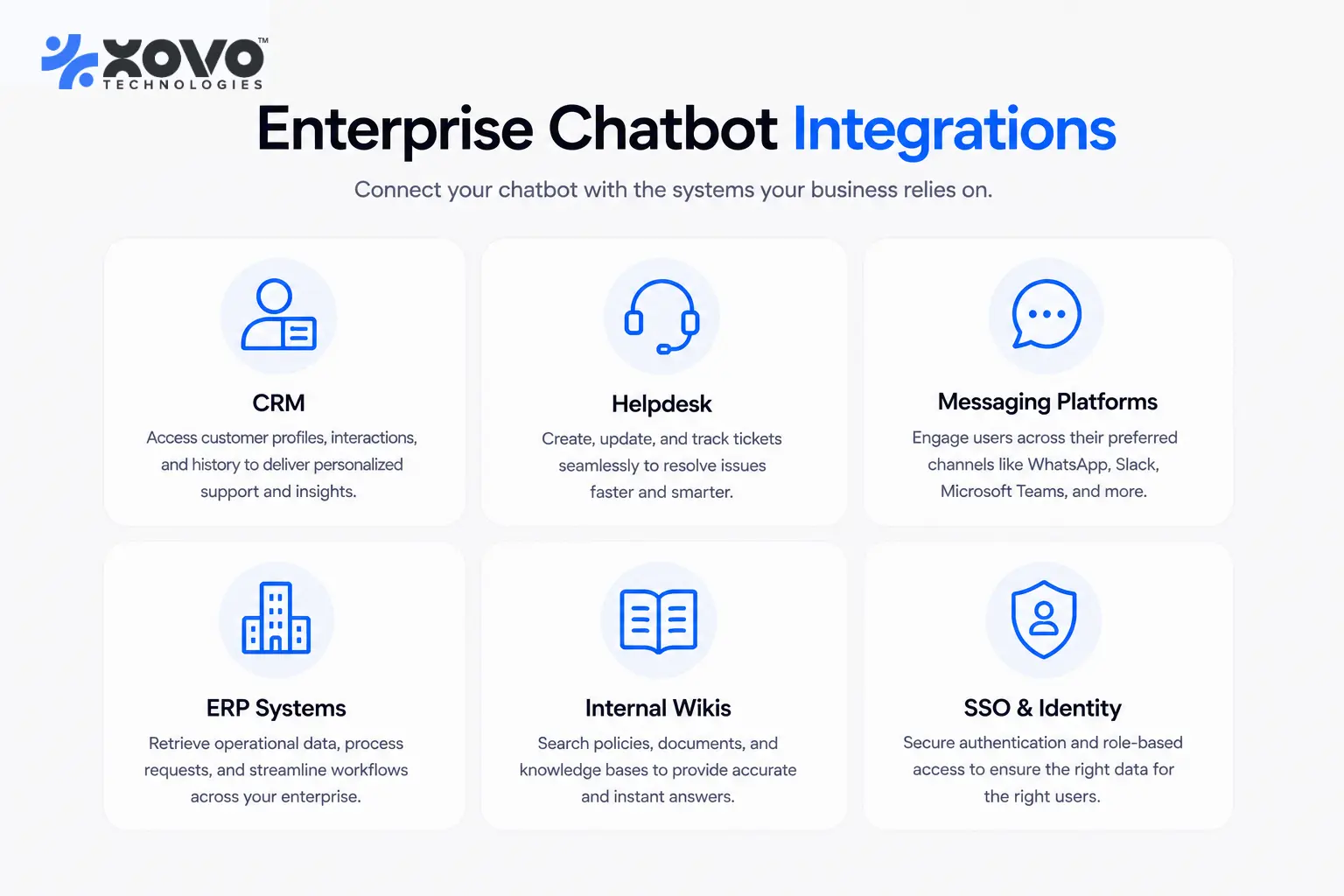
The most common integration categories are:
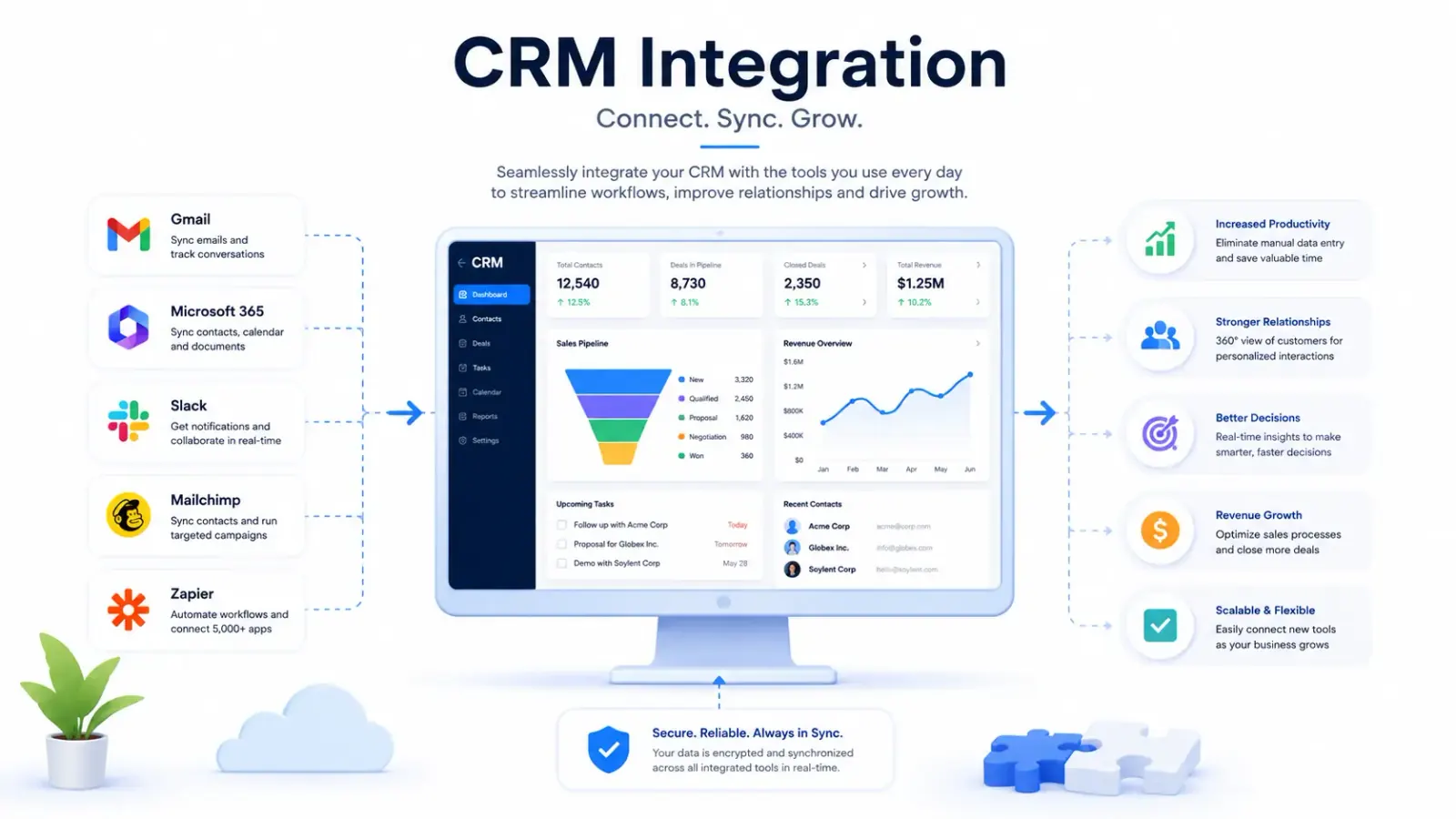
- CRM and support: Salesforce, HubSpot, Zendesk, Freshdesk
- Productivity and messaging: Google Workspace, Microsoft 365, Slack, Microsoft Teams
- Commerce and operations: ERP systems, inventory platforms, order management tools
- Internal knowledge: Confluence, SharePoint, internal wikis, and policy PDFs
- Identity and access: SSO providers, for role-based permissions on what the bot can retrieve and say
XOVO Technologies maintains more than 50 pre-built integrations across these categories. Most enterprise chatbot development starts from one of these existing connectors, with custom integration work reserved for the systems that don't already have one. For the specifics of connecting a chatbot to a company's own website, CRM, and Google Workspace account, see our guide to chatbot integration across websites and business apps.
How Do You Keep an Enterprise Chatbot Secure and Compliant?
Security on an enterprise chatbot comes down to four controls: where the model runs, who owns the underlying code and weights, whether a human reviews uncertain answers before they reach a customer, and how conversations are logged for audit. Get these four right and most compliance requirements, from healthcare data rules to financial services review processes, fall into place around them.
For regulated industries, XOVO Technologies deploys models in private or air-gapped environments so sensitive data never leaves the client's own infrastructure, and the client keeps the source code and model weights, so the deployment doesn't depend on a vendor's continued willingness to grant access. Every autonomous agent XOVO Technologies builds, chatbots included, escalates to a human by default when confidence is low or the request is high-stakes; that rule isn't a configurable setting. We go deeper on the guardrail design behind this in our agentic AI architecture and guardrails guide, and on private hosting specifically in our private LLM hosting guide.
What Results Should You Expect From an Enterprise Chatbot?
Results vary by use case, but XOVO Technologies' own Enterprise AI Chatbot resolves up to 80% of customer queries without a human agent stepping in, once it's connected to the right data sources and tuned against real conversation logs. That figure comes from live client deployments, and it depends heavily on how much of the system integration work described above actually gets done.
The gap between a chatbot that hits that number and one that plateaus around 40-50% resolution is rarely the language model. It's whether the bot can actually retrieve the answer, whether it's allowed to take the action the customer is asking for, like issuing a refund or rebooking an appointment, and whether the escalation path is fast enough that a stuck conversation doesn't sour into a bad review before a person picks it up. Companies running high support volume alongside the chatbot often pair it with XOVO's AI Support Architect to orchestrate the handoff across chat, email, and voice channels instead of chat alone.
The pattern holds across use cases even though the numbers differ. A customer support deployment answering order and billing questions tends to resolve more on its own than an internal IT helpdesk bot fielding password resets and software access requests, mostly because customer questions repeat more predictably than employee requests do. Either way, the fix for a low resolution rate is almost always the same: connect the bot to more of the actual data source, not a bigger or more expensive model.
How Does XOVO Technologies Build Enterprise Chatbots?
XOVO Technologies scopes every enterprise chatbot engagement around the client's actual support and sales data before writing a line of integration code, then builds on LangGraph or CrewAI for orchestration, retrieval-augmented generation over a vector database such as Pinecone, Weaviate, Qdrant, or pgvector, and MCP for connecting to the client's existing tools.
"The biggest mistake we see enterprise teams make is picking the model first and the data architecture second," says Sufi Inam Ul Hassan, XOVO Technologies' Founder and CTO. "A chatbot is only as good as what it can retrieve and what it's allowed to do once it retrieves it. We design the data connections and the escalation rules before we lock in which model handles which conversation type."
On the business side, Syeda Kinza Batool, XOVO Technologies' Co-Founder and CEO, leads the use-case scoping work with each client's support and sales leadership before engineering starts, so the chatbot gets built against the questions customers actually ask rather than the ones a generic script assumes. That scoping step is also where XOVO decides which product fits: a standalone deployment of the AI Chatbot platform, or a broader rollout that folds in voice and email through the Support Architect product.
For a full breakdown of how XOVO scopes, prices, and schedules a chatbot build end to end, see our guide to chatbot development services, cost, and timeline.
If you're ready to see what an enterprise chatbot built on your own data would actually resolve versus escalate, book a free AI audit with XOVO Technologies, and we'll map it against your current support and sales stack before you commit to a build.