Most customer communication platforms integrate custom AI chatbots: Zendesk, Intercom, HubSpot, Freshdesk and Salesforce Service Cloud through documented REST APIs and webhooks, Slack and Microsoft Teams through their app platforms, telephony through WebSocket streaming. What an enterprise AI chatbot development service adds is the handover protocol, because only Zendesk publishes a formal one.
Everything below was checked against each vendor's own developer documentation on 12 September 2026. Integration behaviour changes without a press release, so where I could not verify something directly I say so rather than filling the gap.
The integration matrix: what connects, how, and who owns the conversation
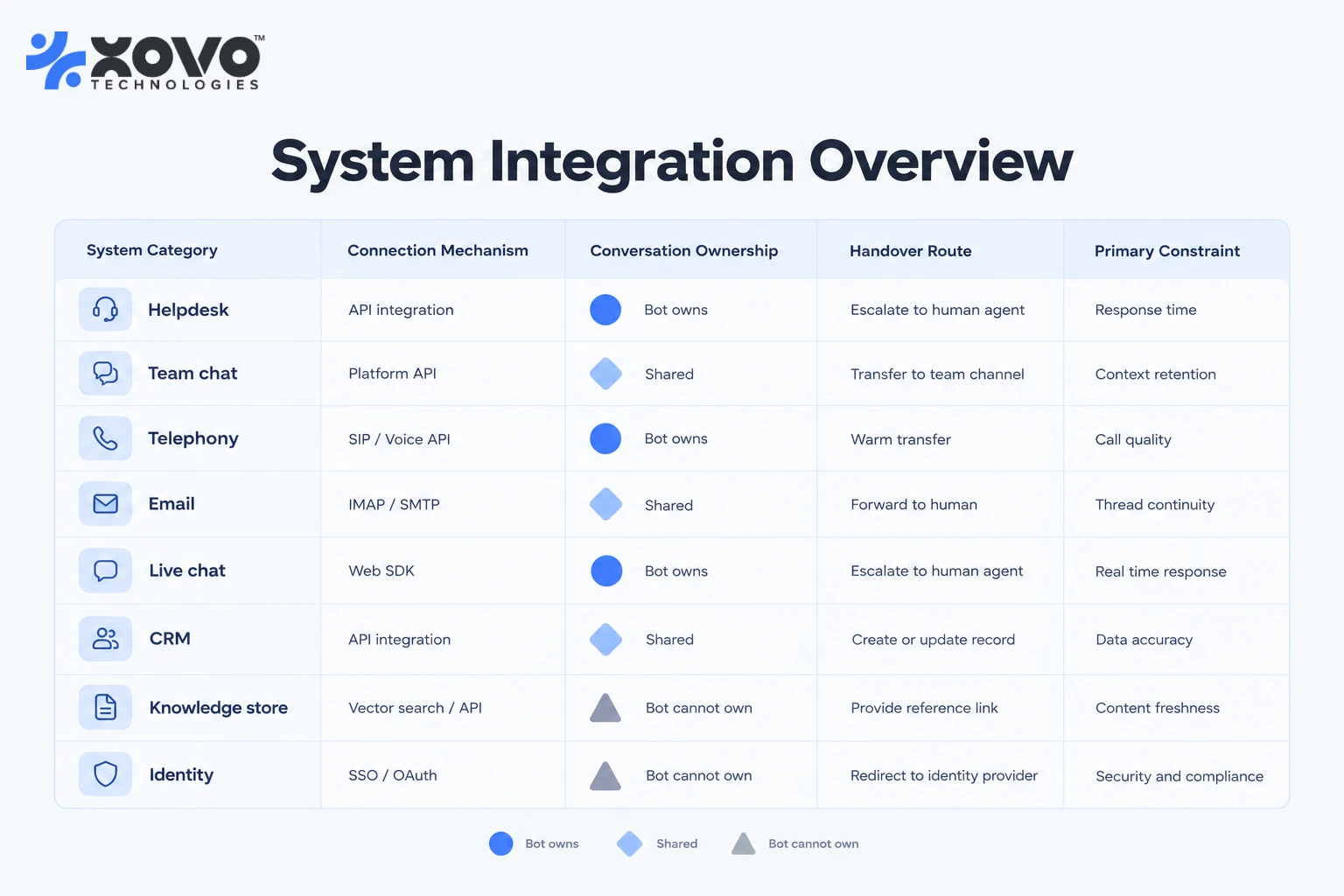
The question buyers actually ask is not whether a custom AI chatbot can be integrated. It is which system ends up owning the conversation, and what happens at the moment a human needs to take it back. Those two answers differ by platform, and they are what this table encodes. Every column is a decision you will have to make before anyone writes code.
| System you already run | How a custom chatbot connects | Can the bot own the live conversation? | How a human takes it back | The thing that breaks |
|---|---|---|---|---|
| Zendesk messaging | Native switchboard integration on Sunshine Conversations, plus REST API and webhooks | Yes, as the active switchboard integration | passControl to Agent Workspace, which makes a ticket eligible for assignment | Ticket-field metadata is honoured only on the first escalation |
| Zendesk email and web-form tickets | Ticketing REST API, webhooks, or a sandboxed app in the agent sidebar | No. The ticket is the unit of work, not the conversation | Assignment rules and triggers | No turn-taking. The bot drafts, it does not talk |
| Freshdesk | REST API v2 plus platform apps, front-end or serverless | Partly. Bot replies land as ticket conversations | Agent reply and assignment rules | Hard platform quotas on requests, payload size and execution time |
| HubSpot Service Hub | Custom Channels API v3 registers a channel of your own into the inbox and help desk | Yes for the channel you registered, no for HubSpot's own channels | A rep replies in the inbox and HubSpot webhooks it to you to deliver | The threading model is chosen at registration and is painful to change |
| Intercom | Canvas Kit app in Messenger and Inbox, plus the Conversations REST API and webhooks | Partly. You reply as an admin, or run a Workflow | Assign to a teammate or a team | Bot replies on inbound email conversations are not delivered to the customer by default |
| Salesforce Service Cloud | Agent API sessions, synchronous or server-sent events, and Messaging for In-App and Web | Yes, inside a session you started | Escalation into standard Omni-Channel routing | At least one agent type is excluded from the Agent API |
| Slack | Slack app with the Agents and AI Apps feature, Events API, streaming methods | Yes, but only in a direct message with the app | Nothing native. You route the thread into your helpdesk yourself | Workspace guests cannot use apps with the Agents feature enabled |
| Microsoft Teams | Custom engine agent on the Teams SDK or the Microsoft 365 Agents SDK, behind Azure Bot Service | Yes, in personal chat, group chat and channels | Nothing native. You post into a channel or open a ticket | Mixing streamed text and attachments in one turn reorders the messages |
| Telephony and voice | WebSocket media streaming between the carrier and your application | Yes, for the length of the call | Warm transfer to a queue, carrying a summary you generate | Latency and interruption handling, not comprehension, decide quality |
| IMAP and SMTP, or the mail provider's API. No real-time protocol exists | Yes, asynchronously | A human replies from the shared mailbox | There is no session. Every message has to re-establish context | |
| Live chat widget on your own site | Your own JavaScript widget, or the helpdesk vendor's web SDK | Yes | Whatever the helpdesk vendor above allows | An anonymous session cannot be authenticated retrospectively |
| CRM write-back | REST API, called from a queue behind the conversation rather than inside it | Not applicable. It is a sink, not a channel | Not applicable | Writes fail silently unless you build the retry and the alert |
| Knowledge base and document stores | Scheduled or webhook-triggered ingestion into a vector database | Not applicable | Not applicable | A stale index, or one that ignores document permissions, causes most bad answers |
| Identity, SSO and provisioning | SAML or OIDC for sign-in, SCIM for user provisioning | Not applicable | Not applicable | The bot can be authenticated while the person in the conversation is not |
Read the third column first. Wherever it says "partly" or "no", you are not building a chatbot for that system. You are building a drafting assistant that a human sends. That is a legitimate product and often the better one, but it is scoped, priced and measured differently, and it will never move a containment rate.
Read the fifth column second. Every entry in it is a documented constraint rather than a hypothetical, and each one has cost somebody a schedule. Finding one of them in week nine is the most expensive way to run a chatbot programme.
The five integration surfaces, and why the difference decides your budget
Vendors use the word "integration" for five mechanisms that have almost nothing in common. Sorting the list is the first thing we do on a scoping call, because the mechanism sets the cost, not the size of the vendor's logo.
A native app means the platform hosts your interface inside its own UI. Intercom's Canvas Kit is the clearest example: you return JSON describing text, tables, inputs and buttons, and Intercom renders it in the Messenger and the Inbox. Zendesk's apps framework works similarly through a sandboxed iframe, which is why a v2 Zendesk app has no access to the host page's DOM and has to request everything through the framework's own client. Native apps look the most integrated and are the most constrained. You get the platform's components and the platform's layout rules, and nothing else.
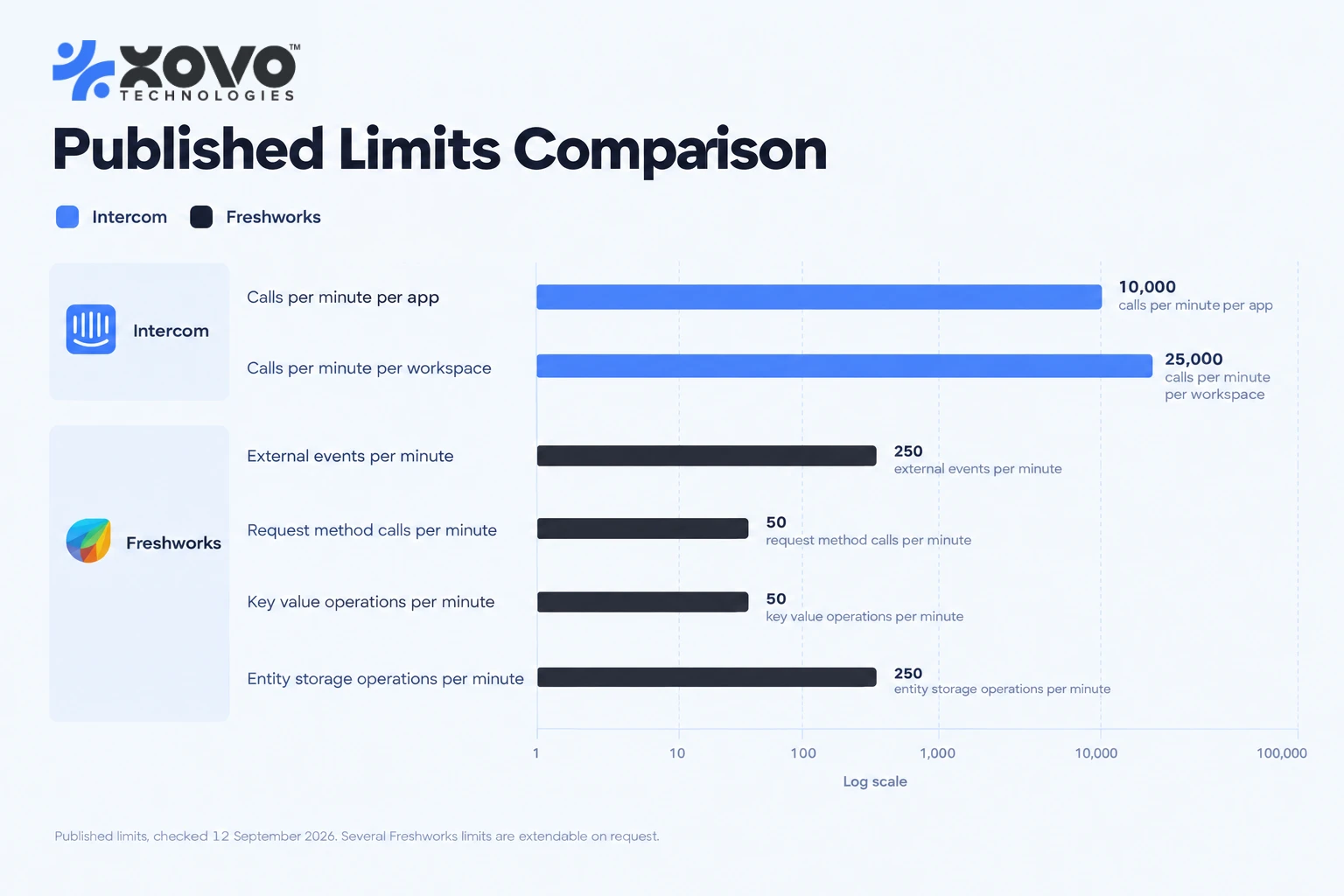
A REST API means you call the platform to create, read and update its objects: tickets, conversations, contacts, notes. This is where most real work happens, and it is where rate limits live. Intercom documents 10,000 API calls per minute per app and 25,000 per workspace, with the allowance resetting every ten seconds rather than every minute. The Freshworks platform, by contrast, caps a Freshdesk app at 50 request-method calls per minute per installation, with a 15-second execution ceiling extendable to 30, a 100 KB payload limit on external events and a 6 MB response ceiling. Those two numbers describe different architectures. One lets you call the platform inside the conversation loop. The other forces you to queue.
A webhook means the platform calls you when something happens. It is the only way to be genuinely event-driven and it is the most under-tested part of most chatbot builds. Webhooks retry, arrive out of order, arrive twice, and arrive after your service has already acted on the same event through another path. HubSpot's Custom Channels API provides an integrationIdempotencyId for exactly this reason. If your build has no idempotency key on inbound events, it has a data-corruption bug that simply has not fired yet.
Middleware means an integration platform sits between the chatbot and the system of record. Sometimes that is right, particularly for a long tail of back-office systems nobody wants to write a connector for. Inside the conversation loop it is usually wrong, because you have added a second network hop and a second vendor's rate limit to a path where a person is watching a typing indicator.
None means no supported mechanism exists, and the only route is screen scraping, robotic process automation or an unsanctioned database read. We do not put these in a conversational path. They break on the vendor's release schedule rather than yours, and they break silently.
Most enterprise AI chatbot solution work uses three of the five at once: a native app for the agent-facing surface, REST for reads and writes, webhooks for events. Quoting a project as though it is one mechanism is how estimates end up half the size of the build.
Helpdesk and ticketing: what each platform actually lets a bot do
This is the centre of the customer communication stack, so it is worth going platform by platform. What follows comes from each vendor's own developer documentation, checked on 12 September 2026.
Zendesk: the only formal handover protocol I could find
Zendesk is the outlier here, and it is worth understanding even if you run something else, because it shows what a complete handover design looks like.
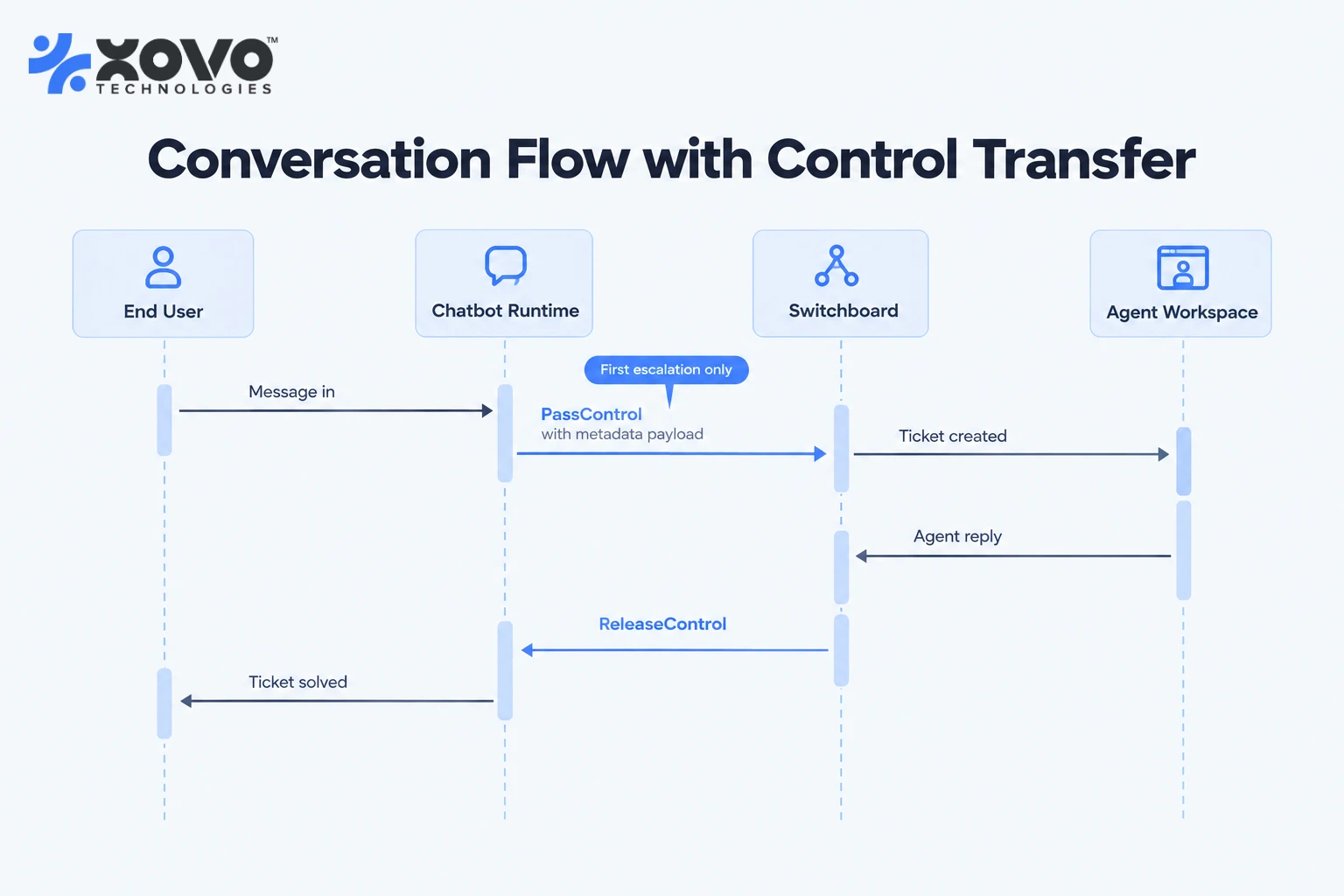
Sunshine Conversations includes a routing layer Zendesk calls the switchboard. Each participating system, whether that is your bot, a third-party AI agent or the Zendesk Agent Workspace, registers as a switchboard integration. Zendesk's switchboard developer documentation defines three states per conversation, active, pending and standby, and states plainly that a conversation can have only one active switchboard integration at a time. Control moves with four operations: passControl hands over immediately, releaseControl clears the active integration without naming a successor, and offerControl paired with acceptControl supports a negotiated transfer.
Four things in that documentation should shape your build, and three of them are warnings.
The next keyword lets an integration escalate without knowing the topology, because each integration carries a nextSwitchboardIntegrationId. Your bot escalates to "next" and an administrator decides what next means. That is good design and worth copying even on platforms that do not offer it, because it keeps routing policy out of your application code.
Ticket-field metadata attached to a passControl call is respected only on the first escalation of a conversation. Zendesk documents this explicitly and the reasoning is sound: a later system should not overwrite fields set at the point of escalation. The consequence for you is that everything a human agent needs, priority, tags, custom fields and the point in the conversation transcript where the ticket should begin, has to be right on the first handover. There is no second chance to enrich it.
Zendesk also documents that offerControl and acceptControl are supported by the protocol but not used by Zendesk's own systems in practice, and that issuing offerControl to Agent Workspace will not behave as expected. Build on passControl.
And the switchboard is signalling, not permission. Zendesk states that all integrations can read from and write to a conversation at any time regardless of status, and are merely expected to respect it. If you run two bots and a human queue against one conversation, nothing at the platform level stops all three replying at once. That guarantee has to come from your code, usually as a lock keyed on the conversation ID.
For teams running Zendesk email and web-form tickets rather than messaging, none of the above applies. There the unit is a ticket, the bot is a classification and drafting service, and the honest way to describe the result is agent assist rather than automation. Zendesk's own release notes through 28 August 2026 point the same way, adding flags in the conversation logs for end-user messages an AI agent ignored while executing a process, which is a diagnostic feature rather than a capability one.
Intercom, HubSpot and Freshdesk
Intercom splits cleanly in two. Canvas Kit gives you a native surface in the Messenger and the Inbox, with an initialize and submit request flow, an optional configure step, HMAC-SHA256 signing on every request and a requirement that your service is served over HTTPS. The Conversations REST API gives you everything else: create, reply, assign to a teammate or a team, add a note, tag, snooze, merge and convert to a ticket. Intercom separates conversation.admin.replied from conversation.operator.replied in its webhook topics, which is how you distinguish a human reply from a bot reply in your own reporting rather than inferring it.
The trap in Intercom is email. Intercom's documentation states that bot replies to an inbound email conversation are not sent to the customer by default and are stored as an unnotifiable comment. A chatbot integration that tests beautifully in the Messenger and silently answers nobody on email is a common failure mode, and it raises no error while it happens.
HubSpot Service Hub took a different route. The Custom Channels API, which HubSpot's own changelog records as generally available since 10 April 2025 for Sales or Service Hub Professional and above, lets you register a messaging channel of your own into the conversations inbox and help desk. You publish inbound messages to HubSpot, and HubSpot fires OUTGOING_CHANNEL_MESSAGE_CREATED when a rep composes a reply for you to deliver on the end channel. The decision that matters is threading. You choose INTEGRATION_THREAD_ID, where you own thread identity, or DELIVERY_IDENTIFIER, where HubSpot derives it from the participants and permits only one active thread per set of identifiers. That choice is made at registration, it governs how every later message is matched, and I would not want to migrate it on a live inbox. HubSpot also documents that an archived thread reopens automatically if a message arrives within 24 hours of closure, which you have to model or your conversation counts will never reconcile with theirs.
Freshdesk is the most quota-bound of the four. The Freshworks developer platform publishes per-installation limits rather than per-account ones: 250 external events per minute, 50 request-method calls per minute, 50 key-value storage operations, 250 entity-storage operations, a 20-second execution ceiling on event handlers, two minutes for jobs, a maximum of 15 concurrent jobs and 25 custom apps per account. Several are extendable on request. None are generous enough to run a retrieval augmented generation loop inside the app itself. The workable pattern is a thin Freshdesk app that forwards to your own service, which holds the model calls, the vector database and the retry logic and returns a result the app renders. Build it the other way round and the first busy Monday takes it down.
Salesforce Service Cloud
Salesforce exposes conversational agents through the Agent API. Per Salesforce's developer documentation, you authenticate a connected app using the OAuth client credentials flow, start a session and receive a sessionId, then send messages either to a synchronous endpoint or to a streaming endpoint returning server-sent events, incrementing a sequence ID per message, and end the session when the conversation closes. Salesforce's documentation also notes that the Agent API does not support agents of the "Agentforce (Default)" type, and that since April 2026 what were previously called topics are called subagents.
One caveat specific to this section. Salesforce's developer documentation site returned HTTP 403 to my automated fetches on 12 September 2026, so the details above come from Salesforce-published text surfaced through search rather than a page I loaded directly. Confirm them against the live guide before designing around them. That is the honest confidence level and I would rather state it than round it up.
The wider point for Salesforce shops is that the conversation and the record live in one system, which removes a class of synchronisation problem and replaces it with a governance one. Field-level security, sharing rules and org-wide defaults all apply to whatever identity your integration runs as. A chatbot that can read a case the human it is helping cannot read is an audit finding waiting to be written.
Can an enterprise AI chatbot work inside Slack and Microsoft Teams?
Yes, and a good share of 2026 budget is going there, because internal support deflects as well as external support does and the business case is easier to sign off. Both platforms now have a first-class agent surface. Both carry a constraint that surprises people late.
Slack's agent features, documented on the Slack developer site and checked on 12 September 2026, require the assistant:write and chat:write scopes, the Agents and AI Apps feature enabled, and subscriptions to app_home_opened, message.im, app_context_changed, agent_session_stopped and agent_session_title_changed. Streaming is explicit rather than incidental, through chat.startStream, chat.appendStream and chat.stopStream. Status is explicit too, and Slack's AI app development documentation notes that the loading state does not clear by itself, so you have to set the session status back to active once processing finishes. The older assistant experience is deprecated in favour of the agent experience, which matters if you have inherited a 2025 build.
The constraint: agent conversations happen in direct messages with the app, and workspace guests are not permitted to use apps with the Agents feature enabled. If your support model runs on contractors or client-side guests in shared channels, that rules out the native agent surface and pushes you back to a conventional Slack app with a bot user, slash commands and Block Kit.
Microsoft Teams runs a different model. A conversational AI application in Teams is a bot registered with Azure Bot Service, and the recommended shape in 2026 is a custom engine agent. Microsoft's custom engine agent overview, last updated 11 August 2026, sets out four build routes, Copilot Studio, the Microsoft 365 Agents SDK, the Teams SDK and Microsoft Foundry, and is direct about the trade-off. The Teams SDK reaches Teams and Microsoft 365 Copilot only. The Microsoft 365 Agents SDK reaches Copilot, Teams, partner apps, mobile apps and custom websites, which is the route to take when the same agent will also serve your public site. Custom engine agents require app manifest version 1.21 or later. Microsoft has renamed the Teams AI library to the Teams SDK and deprecated version 1 of the library.
The constraint here is message ordering, and it is oddly specific. Microsoft documents that Teams and Copilot render agent messages using server timestamps and activity IDs, and that mixing streaming text, media attachments and final messages inside one user turn can make messages appear out of sequence. The guidance is one streaming sequence per turn, attachments set inside the stream rather than sent separately, no new stream before the previous one is finalised, and no updates after the stream ends. This is the kind of detail that never appears in a demo and always appears in week three of a pilot.
The Teams platform is also moving in a direction worth planning for. The current SDK supports the Model Context Protocol and agent-to-agent communication, so an agent in Teams that calls other agents is a supported pattern rather than an improvisation. Anyone designing a multi-system escalation path across Microsoft estates should read that as a signal about where routing logic will eventually live.
Scoping an internal rollout? Our custom AI chatbot development and integration service runs a two-week integration discovery that ends with a written connector inventory, a handover design and a rate-limit budget for every system in the path. For the category-level picture first, start with the enterprise conversational AI guide.
Telephony and voice: the phone is a different integration entirely
Voice is not another channel on the same integration. It is a separate product with separate failure modes, and treating it as a checkbox on an omnichannel roadmap is how phone deployments go badly.
The mechanism is a WebSocket. Twilio's ConversationRelay, for example, streams recognised speech from the call to your application over a secure WebSocket and synthesises your text response back to the caller, so the carrier handles speech recognition and text-to-speech while you handle the reasoning and host the endpoint. Twilio's documentation is clear that hosting that WebSocket server is your responsibility, and that human review of model input and output remains yours as well.
What changes is that the design now has a clock on it.
The latency budget is spent before you write a prompt
A voice turn has a fixed budget before the caller decides the line has dropped, and four things consume it in sequence: endpointing, which is the decision that the caller has stopped speaking; your retrieval and tool calls; the model's time to first token; and the time text-to-speech takes to start producing audio. Only the middle two are yours to shorten.
So work that sits inline on chat has to move. Pre-fetch on call setup, using the calling number to pull the contact, the open cases and the last order before the caller has finished saying hello. Speculative fetch on partial transcripts while they are still talking, which trades wasted calls against a rate limit for a shorter turn. Or honest filler, where the agent says it is looking something up, which is only acceptable if something is genuinely being looked up.
This is where the rate limits listed earlier stop being an operational concern and become a product one. A 50-requests-per-minute ceiling is fine for a support inbox and unusable for a call queue, because on voice you cannot absorb the wait by queueing.
Barge-in changes what the bot said
When a caller talks over the bot, you stop playback. The integration problem is what you then record as having been said. Your transcript holds the full response you handed to text-to-speech. The caller heard the first eight words of it. Log the whole thing as spoken and three downstream systems are wrong: the summary passed to the agent on transfer, the quality review someone runs next month, and the model's own context on the following turn, which will assume the caller has information they never received.
Track playback position at the moment of interruption and truncate the spoken record to what actually reached the caller. Then decide what counts as an interruption at all. Short acknowledgements are not attempts to take the turn, and a system that mutes itself at every overlap is unusable on a noisy line or a hands-free car kit.
Keypad entry is not a legacy feature
Any prompt asking for structured data should accept DTMF as well as speech. Account numbers, order references, postcodes and dates of birth are where recognition errors are most likely and the confirmation loop is most tedious, and they are exactly what a caller can key in without error. Background noise and accents outside the recogniser's training distribution push the same way.
The case that decides it is the escape hatch. A caller whose speech is not being recognised cannot say "agent". If the only route to a human is a spoken one, the callers most likely to need a human are the ones least able to reach one. A keypad path to the queue that works while recognition is failing costs almost nothing to build.
Recording, consent and the three artefacts nobody classified
Consent requirements for recording differ by jurisdiction and by whether every party has been informed, so the retention decision belongs with counsel. What the integration team owns is the inventory, and voice produces three artefacts where chat produces one: the audio, the speech-to-text transcript, and the model log holding the prompt and the documents retrieved for each turn.
Teams classify the audio and forget the other two. The model log is the one to worry about, because the retrieved set for a turn can hold more restricted material than the answer that reached the caller, a point the permission section below returns to. Disclosure stacks the same way: telling a caller they are speaking to an automated system and telling them the call is recorded are separate statements, and using recordings to improve a model is a third question.
The transfer is warm or it is worthless
On chat, handover means a ticket appears in a queue. On voice it means a person picks up while the caller is listening. If your summary arrives after the agent does, the caller repeats themselves and the deflection saving is spent on the second explanation.
That means a whisper before the call is bridged, or a screen pop that lands first, and the screen pop depends on the CTI layer, which in most estates is the oldest system in the path. Four things travel with the call: the reason for transfer, the caller's identity and how it was verified, what the bot has already told them, and anything the bot committed to. The last matters most. A bot that said a refund would be arranged, followed by an agent who says it cannot be, is worse than no bot. We cover the audio pipeline, turn-taking and transfer design in more depth in our piece on AI voice agents for business.
Email is the channel everyone underestimates
Email has no real-time protocol, no session and no typing indicator. You connect through IMAP and SMTP or through the mail provider's API, and everything else you have to invent.
Three consequences follow. First, threading is yours to manage. Message-ID, In-Reply-To and References headers are the only reliable identity a mail thread has, and subject-line matching fails the moment somebody forwards it. Second, context has to be rebuilt on every message, because the customer may reply four days later from a different address with the entire quoted history attached. Third, an email answer is read as a considered response rather than a chat guess, so the quality bar is higher and the tolerance for a hedge is lower.
Most helpdesks wrap email into their own object model, which helps until it does not. Intercom's default behaviour of not delivering bot replies on inbound email conversations, mentioned above, is the clearest example of a platform making a deliberate safety choice that your design has to accommodate rather than fight. Zendesk's August 2026 release notes describe its agentic email handling several requests in one message rather than escalating, which is a reasonable direction and also a reminder that email automation behaviour is still changing release by release.
Our position: email is the last channel to automate, not the first. Start where the session exists.
Live chat widgets and the session context problem
The widget on your website is the easiest integration to build and the hardest to make useful, because the person in front of it is usually anonymous.
An anonymous session can answer questions about your product, your pricing and your documentation. It cannot answer "where is my order", "what did I pay last month" or "cancel my subscription" without authentication, and an anonymous session cannot be authenticated retrospectively in any way that stands up to an audit. If the conversation begins anonymously and the user later signs in, the correct design is a new authenticated session that carries forward the conversation transcript as context and nothing else. Carrying forward an entitlement is how you build an account-takeover vector out of a support widget.
That decision cascades. It sets whether you need OAuth on the widget, whether the chatbot API integration reads from your own application or from the CRM, and whether the transcript can be stored with the customer record at all. Website-side implementation, including embedding, Google Apps and consent handling, is covered in our earlier piece on chatbot integration for websites and support systems. This article stays on the systems behind the widget.
How does conversation state follow a customer across channels?
It does not, unless you build the thing that carries it, and the first decision is which of two objects you are carrying.
A conversation is a turn-by-turn exchange bounded by one channel and one session. A case is the customer's underlying problem, which outlives every conversation about it. Cross-channel continuity means carrying the case. Teams that try to carry the conversation end up with a bot that recites a phone call back to someone who has opened a web widget, which reads as surveillance rather than service, and which quietly moves data across a trust boundary the caller never crossed.
Identity resolution comes first and is a question about evidence. Channels carry different identifiers: an email address, a calling number that may be withheld, a Slack user ID, a browser cookie with no person attached. A phone number matching a contact record is a hint, not an authentication. What can safely follow an unauthenticated person across channels is the existence and status of an open case, not its contents.
Nobody ships a single store for this either. In a typical estate the helpdesk owns email and web chat state, the telephony platform owns call state, Slack owns Slack, and the CRM holds a contact record updated after the fact. The "unified customer profile" in most product pitches is that contact record, which is a reporting artefact rather than live state. If you need genuine cross-channel continuity, you build it as a case identifier your own service owns and references from each platform's objects, leaving each platform as the system of record for its own transcript.
Two rules keep it sane. State expires, because an intent carried across three days is usually wrong and an authentication carried across three days is a liability. And the expiry window is a decision you write down rather than inherit: HubSpot deciding that an archived thread reopens if a message arrives within 24 hours is the vendor making that call for you on one channel, and the other channels are yours to define.
What should an AI chatbot write back to the CRM?
Less than most briefs assume, and on a queue rather than inline.
The useful writes are narrow: a conversation transcript or a link to it, the resolved intent classification, any entity extraction the conversation produced that the record does not already hold, the outcome, and the escalation reason when there was one. That is enough to make the record searchable and to let you analyse deflection rate against ticket type later. Everything beyond it tends to be a field somebody wanted once.
The writes to refuse are the ones that let a conversation mutate a commercial record without a human in the path. A chatbot that can change a billing address is a support win and a fraud surface. A chatbot that can apply a refund is both of those and a finance reconciliation problem. Where a write has commercial consequence, the pattern we use is that the bot proposes and a human confirms, with the proposal stored as structured data so the confirmation is one click rather than a retype.
The engineering point is that CRM integration belongs behind a queue. The conversation loop should never block on a write to a system of record, because that system's rate limit, maintenance window or field validation error becomes a visible pause in a live conversation. Write to your own store first, acknowledge to the user, and reconcile asynchronously with retries and an alert on the dead-letter queue. Writes that fail silently are the most common data-quality problem we are asked to fix on inherited chatbot builds, and they are almost always the result of a fire-and-forget call with no retry.
Knowledge bases and document stores: the pipeline behind the answer
Retrieval augmented generation is now the default architecture for an enterprise AI chatbot, and the integration question is less about the model than about the pipeline that feeds it.
You are connecting to a help centre, a document store, a wiki, a product catalogue, or all of them. Each needs an ingestion path, a chunking strategy, an embedding step, a vector database, a refresh trigger and an access-control model. The last two are the ones that get skipped, and they have their own sections below because they are where this class of project actually fails.
Two failure modes are worth naming here because they look identical from the outside. An answer that is wrong because the index is stale, and an answer that is wrong because retrieval returned nothing and the model improvised. The second is fixable with a grounding check and a refusal path. The first is not fixable in the model at all. Log which documents were retrieved for every answer, or you cannot tell them apart. Teams that skip that logging spend months tuning prompts to fix a data-freshness bug.
For organisations that cannot send support content to a third-party API at all, the constraint moves upstream into where the model runs, which we work through in the private LLM hosting guide.
How stale is an answer allowed to be?
That depends on the content, and the only version of this that survives contact with an operations team is a written freshness budget per class of content. Pricing, policy, terms, anything with a compliance or contractual consequence: minutes to hours. Product how-to and troubleshooting: a day or two, because the guidance rarely inverts. Reference material, release notes and archived versions: a week. Writing that down lets you choose a sync mechanism per source instead of applying one cadence to everything and paying for the strictest case across the whole corpus.
The mechanisms map onto the budgets. A minutes-to-hours budget requires event-driven invalidation, which means the source emits a publish event and your pipeline re-embeds that specific document rather than waiting for a cycle. A budget measured in days can run on a scheduled delta sync against a modified-since query. A weekly budget can run on a full crawl. Storing a content hash per chunk is what keeps the full crawl affordable, because you re-embed only what changed, and it is embedding cost rather than crawl cost that pushes teams into reducing their cadence.
Deletion is the case that breaks all three. When an article is unpublished or removed, nothing fires, and a delta sync that asks for everything modified since yesterday will never see it, because the document no longer exists to report a modification. The index keeps its copy. That produces the worst failure in this category: the bot holds the only remaining copy of a withdrawn policy and quotes it with total confidence, because nothing in its context contradicts it. Avoiding it requires a reconciliation pass that enumerates the source's current document list and removes index entries missing from it, which is a different job from the sync and has to be scheduled as one.
Three checks tell you the index and the source have diverged before a customer does. Store a source hash, a source last-modified date and a last-verified timestamp on every chunk, and alert when last-verified exceeds the class budget. Run a periodic count-and-hash comparison between source and index, which catches a pipeline that has silently stopped rather than one that is merely behind. And keep a canary set of documents you edit on a schedule, then confirm the change reaches retrieved answers, because a pipeline writing to the wrong collection passes both of the other checks.
Two things belong in the answer itself. Check that a citation URL still resolves before the answer is sent, because a 404 on a cited source is a freshness alarm that the customer should not be the first to see. And pass the source's last-updated date through to the response, so an answer about a policy can say when that policy was last changed. Where a retrieved chunk is older than its class budget, the correct behaviour is to answer with the date attached or escalate, not to present it as current.
Permission-aware retrieval, and why it stalls enterprise deals
The bot can read the knowledge base. Not everyone who asks it a question is allowed to read all of the knowledge base. Everything genuinely difficult about enterprise chatbot retrieval lives in the gap between those two sentences, and it is the question security review asks that pilots most often cannot answer.
It bites on both sides of the firewall. Internally: HR policy restricted to managers, incident postmortems restricted to one team, legal advice restricted to a department, unreleased product documentation visible only to the people building it. Externally: documentation tied to a plan tier, partner-only material, beta guides under NDA, help centre articles restricted to signed-in customers. The mechanics are identical. Only the group names change.
There are three ways to build it and one of them survives an organisation.
| Approach | How it works | Where it breaks | When it is the right choice |
|---|---|---|---|
| Per-user index copies | Build a separate index for each person containing only documents they may see | Cost scales with users multiplied by documents; one permission change invalidates an unknown number of indexes | A handful of fixed roles that almost never change |
| Index-time partitioning | One index per audience group: public, all employees, managers, each region | People belong to many groups at once, so you must query several indexes and merge; similarity scores from separately built indexes are not comparable, so the merged ranking is arbitrary | Few audiences, stable, and non-overlapping |
| Query-time entitlement filtering | Store access-control metadata on each chunk, resolve the requester's groups at query time, apply the filter as a pre-filter inside the vector search | Recall degrades under restrictive filters, so you over-fetch and pay latency; the stored permissions themselves go stale | Almost every real deployment |
The pre-filter word in that last row is doing the work. Post-filtering, where you retrieve the top results and then drop the ones the user may not see, is not an access control. It is a display control. The content has already left the store, and in most implementations it has already been placed in the prompt, which means it can influence an answer it was never allowed to inform. The second failure mode is quieter and more common: a narrowly entitled user's results get filtered down to nothing, the model has no grounding left, and it answers from its parameters. That arrives in your bug tracker as a hallucination problem and it is an access control design problem.
Pre-filtering is correct and it is not free, which is the part vendors do not put on the slide. Approximate nearest neighbour indexes lose recall when a restrictive filter is applied, because the graph traversal keeps landing on candidates it has to discard. You compensate by over-fetching, and over-fetching costs the latency you were protecting on voice. The practical instruction: measure retrieval quality for your most restricted user, not your most permissive one. Every benchmark run as an administrator is measuring a system nobody uses.
Store groups, not people. If user identifiers go into the index, every joiner, leaver and team move invalidates documents. Write the group and role identifiers the source system already uses, and resolve the person to their group memberships at query time against the identity provider, or against a cache of it with a short time to live. A permission change then takes effect on the next question rather than the next re-index, and only a change to a document's own permissions requires touching the index at all.
Which leaves the hardest part. Document permissions go stale, and they go stale invisibly, because changing a document's audience does not change its content. An article moved into a restricted category, a wiki space made private, a folder whose inherited permissions were broken: none of those alter a single byte of the body, so a content-hash delta sync sees nothing to do and moves on. Permissions need their own sync path and their own reconciliation pass, and most connectors give you neither. The cheap mitigation is a check at the end of the turn: before citing a document, ask the source system whether this user can still open it. That is one extra call per citation, it sits where you have latency headroom, and it turns a stale-permission leak into a citation that quietly drops out of the answer.
Ask one more thing of any connector you are evaluating: how it represents an explicit deny. Most capture allow lists and lose denies and inheritance breaks entirely, which makes the model permissive by default in precisely the cases where somebody deliberately locked something down.
The audit problem is why this is worth a section rather than a paragraph. If the bot paraphrases a restricted document without citing it, the disclosure leaves no trace and nobody can investigate it, because nothing recorded that it happened. Requiring a citation on every grounded answer and logging the full retrieved set per turn is what makes an incident reconstructable, and it is the same log that tells you whether a wrong answer came from stale data or improvisation. Microsoft's published guidance for pro-code agents points the same way: those agents reach Microsoft 365 content through Graph APIs and the Retrieval API rather than getting the native access a Copilot Studio agent has, precisely so the caller's permissions apply.
When the platform cannot filter at query time on the end user's identity, the honest answer is unpopular and we give it anyway: restrict the corpus to material every member of that audience may see, and route everything else to a human. Moving the model inside your own boundary does not substitute for this. It changes where the data sits, not who may see it, and retrieval still has to know who is asking. If that route is on the table for other reasons, our private LLM deployment cost model covers what it costs to run.
The demo question that separates a real implementation from a slide: ask to see two users with different entitlements ask the same question and get different answers, with the filter applied before retrieval rather than after. Then ask what happens in the window between one of them losing access and the next re-index.
Does an enterprise AI chatbot need SSO, SAML and SCIM?
For an internal deployment, yes, and earlier than you think. For a customer-facing one, the answer is more interesting.
Internal chatbots inherit your identity stack because your security team will not accept a second user directory. That means SAML or OIDC for sign-in, and SCIM for provisioning and, more importantly, deprovisioning. SCIM is not a vendor feature, it is an IETF standard: RFC 7644, published in September 2015, defines the HTTP protocol, the /Users and /Groups endpoints, and PATCH semantics for partial updates. If a conversational AI platform claims SCIM support, that is the specification it should be implementing, and the question to ask is which operations it actually supports rather than whether the box is ticked. Partial SCIM support that creates users but does not deactivate them is worse than no SCIM at all, because it produces a false sense of lifecycle control. It is also the upstream half of the permission problem above: group memberships resolved at query time are only as current as the directory feeding them.
Customer-facing chatbots usually do not use SAML. They authenticate against your own application's session or an OAuth token, and the integration question becomes how the chatbot proves to your backend which customer it is acting for. The rule we apply is that the chatbot never holds a credential that grants more access than the user it is serving. Service-account access with a customer ID passed as a parameter is convenient, it is what most quick builds do, and it means a prompt injection in a support ticket can read another customer's data.
The audit trail requirement follows from both. Every action the bot takes on a system of record should be attributable to a conversation, a user and a timestamp, and that record needs to outlive the conversation store's retention policy. Where data residency is contractual, the same applies to the transcript, the vector index and the model logs, which are three separate storage decisions that people routinely treat as one.
PII redaction sits here too. Redact at ingestion rather than at display, because a transcript stored unredacted is a transcript that will be exported unredacted by someone building a dashboard eighteen months from now.
Deflection, ticket creation and agent assist are three different products
They get quoted as one thing, scoped as one thing and then measured against a single number, which is how a successful project gets reported as a failure.
Deflection means the customer's problem is resolved without a human touching it. It requires the bot to own the live conversation, so it is only available on the platforms whose third column above says yes. It is measured by containment and, more honestly, by whether the same customer returns on the same issue inside a defined window, because a contained conversation that generates a ticket two days later was not a deflection.
Ticket creation means the bot never resolves anything and collects instead: the account identified, the error message captured, the screenshot attached, the reproduction steps asked for, the right queue chosen. The ceiling is lower and the risk is far lower, and it works on exactly the ticket-oriented platforms where the bot cannot talk, which makes it the correct product for email and for Zendesk web-form ticketing. It is measured in handle time and reopen rate, not containment, and a team that reports it as containment will show a number close to zero and conclude the project failed.
Agent assist means the bot never faces the customer at all. It drafts, retrieves, summarises and classifies inside the agent's sidebar. The integration surface differs, the latency tolerance differs because an agent will wait three seconds where a customer will not, the failure cost differs because a human filters every output, and the measure is draft acceptance rate and how heavily agents edit what they accept rather than customer satisfaction. Permission-aware retrieval is easier here too, because the agent's own identity is available in the sidebar context, which is not true of an anonymous widget.
Who gets the satisfaction score when a bot and a human both touched the case?
The agent named on the ticket, in almost every default configuration, because the survey fires at case close and attributes to the assignee. That is how a bot ends up with credit for nothing and blame for everything.
Report it in three segments instead: bot only, bot then human, human only. Expect bot-then-human to score below human-only for a reason that has nothing to do with the bot. Cases that escalate are harder, so the escalated population is selected for difficulty and for customers already having a bad day. Comparing those two segments directly and concluding the bot damaged satisfaction is the most common analytical mistake in this category, and it has killed working deployments.
The comparison that means something is bot-then-human against human-only within the same intent and complexity band, which is only possible if the intent classification and the escalation reason are on the ticket. That is what makes the narrow CRM write-back list earlier in this article worth the engineering: it is not record-keeping, it is the only thing that lets you measure the system fairly six months later.
Where does handover to a human actually break?
Five places, in roughly the order we see them.
The context does not travel. The bot escalates and the agent opens a ticket containing a link, a customer ID and nothing else. This is the most common failure and the most preventable one. Zendesk's metadata-on-first-escalation rule is the sharpest version of the constraint, but the underlying discipline is universal: decide what the agent needs, assemble it before you escalate, and pass it in the same call that transfers control.
Two systems answer at once. Covered above for Zendesk, where the switchboard signals status but does not enforce it. The same risk exists anywhere you have a bot and a human queue attached to the same conversation object. A conversation-level lock with a short lease is not optional.
The escalation path has no destination out of hours. Containment looks excellent at 2am because there is nowhere to escalate to. The metric that catches this is not deflection rate, it is the abandonment rate on conversations where the bot offered a human and the user took the offer. If you are not measuring that, your first contact resolution number is flattering you.
The handover is one-way. A customer escalated to a human, resolved, and comes back three days later. Does the conversation return to the bot, or does it stay with the agent who touched it last? Zendesk's releaseControl reassigns to the current default integration when the user returns, which is a real design decision expressed as an API call. Most other stacks leave it to you, and most teams do not decide it until a customer complains.
Nobody tracks the handover as an event. If escalation is not a first-class event in your analytics with a reason code attached, you cannot tell a bot that is appropriately escalating hard cases from a bot that is quietly failing on easy ones. Containment rate alone cannot distinguish them. The economics of that distinction, and what deflection actually costs per resolved contact, are worked through in our analysis of customer service automation economics.
What an enterprise AI chatbot development service should deliver on integration
Ask for these six artefacts before the contract, not at handover. Any competent conversational AI platform partner will already have them.
A connector inventory naming every system in the path, the mechanism used for each, the authentication method, and who owns the credential. If a system appears with "API" and nothing else, it has not been scoped.
A rate-limit budget showing the expected call volume per system at peak against that system's published limit, and what happens when the limit is hit. The answers should be queue, degrade or refuse, and they should be written down.
A handover design covering what is passed at escalation, the lock that prevents concurrent replies, the out-of-hours path, and what happens when a resolved conversation reopens. One page is enough. The absence of that page is the single strongest predictor of a chatbot pilot that fails on operations rather than on model quality.
An entitlement and freshness policy listing, for every knowledge source, who is allowed to see it, how that permission is represented in the index, how the permission itself is kept current, how often the content syncs and what happens to an answer drawn from a chunk older than its budget. This is the artefact that is almost never produced and almost always requested by security review.
A sandbox and test plan covering the non-obvious cases: duplicate webhooks, out-of-order events, a system returning 429, a transfer to an empty queue, a document deleted at source after indexing. Most platforms provide a sandbox or developer account. Building against production because the sandbox was inconvenient is a decision that gets discovered during an incident.
An audit and retention map showing where transcripts, retrieved documents and model logs are stored, for how long, and in which region. Three stores, three decisions, and a fourth on voice where the audio is its own artefact.
We build this way because it is what the failures taught us. If you want to see the deliverable shape before you commit, our AI chatbot product page shows the runtime, AI Support Architect shows the support-side design tooling, and the full-stack engineering team is who builds the connectors when the systems in the path include something you wrote yourselves. If you are still deciding whether to build this in-house or hire, our comparison of chatbot build and hiring models covers that question rather than this one.
What we would not integrate
We would not put a system with no supported API inside a conversational path. Robotic process automation against a vendor's web UI works until the vendor ships a release, and the release does not wait for your maintenance window.
We would not let a chatbot write to a finance or billing record without a human confirmation step, whatever the containment rate cost. The recovery path for a wrong support answer is an apology. The recovery path for a wrong refund is a reconciliation project.
We would not run retrieval against a knowledge store with document-level permissions unless the filter can be applied before retrieval on the end user's identity, and unless there is a path for permission changes to take effect without a full re-index. Where neither exists, restrict the corpus to what everyone in that audience may see.
We would not promise an enterprise AI chatbot solution for ecommerce that writes to the order management system in the first release. Read-only order status, with a proposed action a human approves, tells you within a month whether the automation case holds, and it cannot cost a customer their delivery.
And we would not quote an integration from a list of platform names. The quote comes from the mechanism, the rate limit, the handover design and the permission model, which is why our scoping call asks which systems have webhooks and which documents have restricted audiences before it asks how many conversations you handle. If you want that conversation, book a scoping session and bring your connector list, including the two systems you were hoping nobody would mention.