Every platform capability, quota and price below was read from the vendor's own current documentation on 13 September 2026. Integration behaviour changes without an announcement, so where a figure depends on a plan tier or a rollout date, that is said in the cell rather than averaged away. Where I could not verify something, it is marked as needing a check against the live docs.
Which platforms integrate custom AI chatbots with existing customer communication software?
Any platform publishing a REST or GraphQL API and webhooks integrates with a custom AI chatbot. That means your own website, Google Workspace through the Gmail, Calendar, Drive, Sheets and Chat APIs, the support tools Zendesk, Freshdesk and Intercom, and commerce platforms such as Shopify. The limit is the permission scope you may request and the customer's plan-tier quota ceiling.
Nobody loses one of these projects on whether an API exists. They lose it on a scope an administrator will not approve, or on a rate ceiling that belongs to the customer's licence rather than to your code.
The matrix below covers the surfaces this article owns: websites, Google Workspace and support tooling. Every cell was read from the named vendor's own developer documentation on 13 September 2026.
| Platform | Connector you build against | Authentication | What the bot can read | What the bot can write | Documented ceiling, 13 Sep 2026 |
|---|---|---|---|---|---|
| Your own website | A JavaScript widget plus a backend endpoint you own | Your own session token; the platform grants nothing | Whatever page and account context you choose to pass | Nothing outside your own application | You set it |
| Gmail | Gmail API, or the Gmail MCP server in developer preview | OAuth user consent, or a service account with domain-wide delegation | Messages, threads, labels, drafts | Drafts, sends, labels | 1,200,000 quota units per minute per project; 6,000 per minute per user; messages.send costs 100 units |
| Google Calendar | Calendar API | OAuth or delegated service account | Events, free and busy blocks | Events, invitations, updates | 10,000 requests per minute per project; 600 per minute per user; daily billing threshold of 1,000,000 requests |
| Google Drive | Drive API, plus the Google Picker API for per-file access | OAuth; a restricted scope if you index everything | File metadata and file content | New files, revisions, permissions | 1,000,000 quota units per minute per project; 325,000 per user; files.list costs 100 units, a download 200 |
| Google Sheets | Sheets API | OAuth or delegated service account | Cell ranges, sheet metadata | Cell ranges, appended rows | 300 read and 300 write requests per minute per project; 60 per minute per user |
| Google Chat | Chat API plus a registered Chat app | Service account for app-authored actions, user OAuth for user-authored ones | Messages, spaces, memberships | Messages, reactions, attachments | 3,000 message writes and 3,000 message reads per minute per project; 300 message searches |
| Zendesk Support and Help Center | Ticketing REST API, webhooks, a sandboxed app in the agent sidebar | OAuth, or an API token over Basic auth | Tickets, users, organisations, Help Center articles | Tickets, comments, article operations | 200 requests per minute on Team, 400 on Growth and Professional, 700 on Enterprise, 2,500 on Enterprise Plus |
| Zendesk Chat | Chat API | OAuth | Chat sessions | Chat messages | 200 requests per minute on every Suite plan, including Enterprise Plus |
| Freshdesk | REST API v2, plus platform apps that run front-end or serverless | API key over Basic auth, or OAuth for published apps | Tickets, contacts, companies, solution articles | Tickets, notes, contacts | 100 per minute on Growth, 400 on Pro, 700 on Enterprise, 50 on trials, with per-endpoint sub-limits |
| Intercom | Conversations REST API plus a Canvas Kit app | OAuth for public apps, an access token for private ones | Conversations, contacts, help centre articles | Replies, notes, tags, assignments | 10,000 calls per minute per app and 25,000 per minute per workspace, distributed into 10-second windows |
| Shopify | GraphQL Admin API | OAuth access token issued per shop | Products, inventory, orders, customers | Orders, draft orders, customers | 100 points per second on standard plans, 200 on Advanced, 1,000 on Plus, 2,000 on Commerce Components |
Sources, all read on 13 September 2026: Gmail API usage limits, Drive API limits, Calendar API quotas, Sheets API limits, Chat API limits, Zendesk rate limits, the Freshdesk API reference, Intercom rate limiting and Shopify API limits.
Helpdesk handover protocols, CRM write-back, Slack, Microsoft Teams and telephony sit in a companion piece on what an enterprise chatbot connects to across the customer communication stack. That article answers who owns the live conversation and how a human takes it back. This one answers what the connector can read, what it can write, what it costs and what revokes it.
What is AI chatbot integration, and what counts as integrated?
AI chatbot integration is the work of giving a language model a credentialed path into the systems that hold your answers, so it can read live state and write an auditable change. A chatbot with no connectors can only restate what is in its prompt and its training. It cannot check an order, read a Drive document, see a Help Center article that changed yesterday or open a ticket, because nothing gives it a route to those records.
Two tests separate an integrated chatbot from a demo. Can it read something that changed in the last five minutes? Can it write a change that a named identity is accountable for? A bot answering from a PDF exported six weeks ago passes neither. A bot drafting a Gmail reply under a service account nobody in your organisation can trace passes the first and fails the second.
The vocabulary matters, because vendors use it loosely. A connector is the code that speaks one platform's API. A scope is the specific permission string the platform grants, such as https://www.googleapis.com/auth/drive.file, which limits the connector to files the user explicitly opened with your app. An index is the searchable copy of your content that the model retrieves from, usually held in a vector database, and it is a copy, which is why it goes stale. Write-back is the connector calling a create or update method, and it is the part that needs a retry queue, because a failed write is silent unless you build the alarm.
Most of the difficulty in these projects lives in scopes and quotas, not in model choice. Model selection and the build-versus-buy question are covered in our guide to custom chatbot building and hiring models.
How does a chatbot actually connect to another system?
Four mechanisms cover almost every integration we build, and they fail in different ways.
Direct REST or GraphQL calls are the default. The bot calls GET /tickets/{id} or posts a GraphQL query, gets JSON back, and the answer is as fresh as the call. The cost is that every call spends quota and adds latency to the reply a customer is sitting and waiting for.
Webhooks run the other way. The platform posts to your endpoint when something changes and you update your own store. This is how you keep a retrieval index current without polling. The failure mode is that a webhook you have silently stopped receiving looks identical to nothing having changed.
The Model Context Protocol is the newest route. Google opened its Workspace MCP server to public developer preview on 1 May 2026, exposing Gmail, Drive, Calendar, Chat and a people dictionary as agent tools, announced on the Google Workspace Updates blog. It is genuinely useful for internal assistants. It is also still a developer preview, and we do not put a customer-facing production path on a preview interface.
Middleware such as Zapier, Make or n8n is the fourth route, and it earns its place on low-volume, low-stakes flows: log a qualified lead to a sheet, notify a channel, fire a follow-up email. It stops earning its place the moment you need per-request error handling, idempotency and a retry queue, because those are things you own in code rather than in a visual builder.
How do you put an AI chatbot on your own website without slowing the page down?
Website integration is two pieces of engineering with different risks. The front end is a widget: a script tag, a chat surface, styling that matches the site, keyboard and screen-reader access. The back end is an endpoint you own that holds the conversation, runs retrieval, calls the connectors and decides when to escalate.
The measurable constraint on the front end is responsiveness. Google's guidance on Interaction to Next Paint, published on web.dev and last updated on 2 September 2025, sets 200 milliseconds or less at the 75th percentile of page views as good, 200 to 500 milliseconds as needing improvement, and above 500 milliseconds as poor. A chat widget loaded synchronously in the document head competes with the page for main-thread time and drags that number the wrong way on exactly the mobile devices where support traffic arrives. Load the widget asynchronously, after first paint, and render the launcher before the transcript engine is ready.
The back end is where the real decisions sit. Retrieval has to be grounded in a named source so the bot can cite the article it used. Session state has to survive a page navigation without leaking one visitor's context into another's. Every connector call made on behalf of an anonymous visitor has to run under an identity that is permitted to act for an anonymous visitor, which is almost never the same identity your internal assistant uses.
The most common website mistake we are asked to fix is an escalation path that does not exist. The bot reaches the edge of what it knows, apologises, and offers the customer nothing. Decide before launch where an unresolved conversation goes and what context travels with it.
What can a chatbot do inside Google Workspace, and what is it allowed to touch?
Google Workspace is the most useful and most underestimated integration surface for an internal assistant, and it is the one where permission design decides whether the project ships at all.
What it can do is straightforward. Read free and busy blocks in Calendar and book a slot. Search Drive and summarise a document in the reply. Append a qualified lead or a resolved support outcome to a Sheet so reporting is live rather than exported. Draft a Gmail reply for a human to approve before it sends. Post into a Chat space when something needs attention.
What it is allowed to touch is where projects stall. Google classifies Drive scopes as non-sensitive, sensitive or restricted, per the Drive API scope guidance updated on 3 September 2026. The scope drive.file is non-sensitive and grants per-file access to files the user opened with your app or shared with it. The scope drive.readonly, which is what "let the bot search all our documents" actually means in practice, is restricted. Restricted scopes carry three consequences that buyers usually discover late.
Only certain application categories qualify for restricted Drive scopes at all: backup and sync tools, productivity and education apps, and reporting and security apps. A customer-facing support bot does not obviously sit in any of the three.
Google's documentation is also explicit that if you store or transmit restricted-scope data on servers, you must go through a security assessment. A retrieval index is stored restricted-scope data by definition. The assessment is the Cloud Application Security Assessment run through the App Defense Alliance, built on the OWASP Application Security Verification Standard and tiered by risk. Assessment fees are quoted by the third-party assessor and I could not find a published price list, so treat this as a line item to scope with an assessor rather than a number you can plan around from a blog post.
Apps requesting restricted-scope data must also complete re-verification annually, per Google's OAuth app verification guidance. That is a recurring compliance obligation attached to a chatbot feature, and it belongs in the running cost rather than the build cost.
The practical consequence: design the Workspace integration around drive.file and the Google Picker wherever the use case allows, and take on restricted scopes only where whole-corpus search is genuinely the requirement. Google's own migration guidance notes that many apps can move to per-file access without code changes.
Which authentication model does each connector need: OAuth, service account or API key?
This is the section nobody writes, and it is the reason integrations fail in production. The model that works on your laptop is frequently not the model that survives a Workspace administrator's policy.
| Authentication model | Who consents | Acts as | Typical production failure | Where it fits |
|---|---|---|---|---|
| OAuth user consent | The end user, on a consent screen | The user who granted it, with their own file and calendar visibility | Refresh token revoked by a password change, an admin policy or six months of disuse | Customer-facing and per-user assistants |
| Service account, no delegation | Nobody; the account is its own identity | Itself, seeing only what is shared with it | Cannot see a user's mail or private calendar at all | Shared drives, app-owned Sheets, Chat app messages |
| Service account with domain-wide delegation | A Workspace super administrator, once, per scope | Any user in the domain it impersonates | Over-broad, and invisible to per-user audit if scoped carelessly | Batch indexing and back-office automation, tightly scoped |
| API key or token over Basic auth | An administrator who generates it | The person the key belongs to | The key inherits that person's permissions and dies when they leave | Freshdesk and Zendesk server-to-server work |
| Per-tenant OAuth install token | The customer installing your app | Your app, inside that customer's workspace | Scope drift between what you request and what they granted | Intercom public apps, Shopify, Zendesk apps |
Four documented behaviours decide whether the model you picked keeps working. All four come from Google's OAuth 2.0 documentation, last updated 26 May 2026 and checked on 13 September 2026.
A Google Cloud project whose consent screen is configured for external users and left in "Testing" publishing status is issued a refresh token that expires in seven days. This is the single most common cause of a Workspace chatbot that works all week and dies over the weekend.
A refresh token also stops working if the user changes their password and the token carries Gmail scopes, if it has gone unused for six months, or if an administrator sets any requested service to Restricted, which surfaces as admin_policy_enforced.
There is a limit of 100 refresh tokens per Google Account per OAuth client ID. When the limit is reached, creating a new one invalidates the oldest without warning. In a setup where staging, production and three developers all authorise the same client, that limit arrives sooner than anyone expects.
Service accounts are not members of your Google Workspace account and are not subject to domain policies set by Workspace administrators. Google gives the example directly: a policy restricting external document sharing does not apply to a service account. If your compliance story rests on Workspace admin policy, a delegated service account walks straight around it.
For support tooling the model is simpler and the risk is different. A Freshdesk API key inherits the permissions of the agent it belongs to, so a key generated from an administrator's account gives a chatbot administrator reach over every ticket in the account. Zendesk supports both OAuth and API tokens, and its apps framework runs an in-sidebar app in a sandboxed iframe with no access to the host page DOM, which constrains what an agent-assist surface can do. Intercom separates private apps, which use an access token scoped to one workspace, from public apps, which go through OAuth on each install.
Our position after building these: per-user OAuth for anything a customer or an individual employee triggers, a narrowly delegated service account only for batch indexing, and never a chatbot holding a credential generated from a human administrator's account. If you are weighing a hosted model against running your own, the identity questions get harder rather than easier, and we set out why in the private LLM hosting guide.
What are the rate limits and quota ceilings on each platform?
Two facts about quotas catch buyers out. Your ceiling is usually set by the plan your customer bought, not by your code. And Google changed the rules for new projects this year.
| Platform | Published ceiling | Basis | Checked |
|---|---|---|---|
| Gmail API | 1,200,000 quota units per minute per project; 6,000 per minute per user; 80,000,000 units per day before the billing threshold | Per project and per user, weighted by method | 13 Sep 2026 |
| Google Drive API | 1,000,000 quota units per minute per project; 325,000 per user; 400,000,000 units and 1 TB of egress per day before the billing threshold | Per project and per user, weighted by method | 13 Sep 2026 |
| Google Calendar API | 10,000 requests per minute per project; 600 per minute per user; 1,000,000 requests per day before the billing threshold | Sliding one-minute window | 13 Sep 2026 |
| Google Sheets API | 300 read and 300 write requests per minute per project; 60 per minute per user | Refilled every minute; 180-second processing timeout | 13 Sep 2026 |
| Google Chat API | 3,000 message writes per minute per project; 300 message searches per minute; 60 space writes per minute | Per project, with separate per-space quotas | 13 Sep 2026 |
| Zendesk Support and Help Center | 200 per minute on Team, 400 on Growth and Professional, 700 on Enterprise, 2,500 on Enterprise Plus | Account-wide, by Suite plan | 13 Sep 2026 |
| Freshdesk | 100 per minute on Growth, 400 on Pro, 700 on Enterprise, 50 on trial accounts | Account-wide, by plan, with per-endpoint sub-limits | 13 Sep 2026 |
| Intercom | 10,000 calls per minute per app; 25,000 per minute per workspace | Distributed into 10-second windows | 13 Sep 2026 |
| Shopify GraphQL Admin API | 100 points per second standard, 200 Advanced, 1,000 Plus, 2,000 Commerce Components | Calculated query cost, leaky bucket | 13 Sep 2026 |
Read the Sheets row twice, because it is the one that bites. Three hundred write requests per minute per project, sixty per minute per user. A chatbot appending one row per resolved conversation will never notice. A nightly job writing a reporting sheet row by row will hit it in the first week, and the fix is batching, not a quota request.
Freshdesk publishes per-endpoint sub-limits underneath the account limit: on Enterprise, ticket creation is capped at 280 per minute and contact listing at 200, inside the overall 700. Invalid requests still count against the limit. Zendesk's Chat API stays at 200 requests per minute on every Suite plan including Enterprise Plus, so buying a larger plan does not buy chat throughput.
Google's position changed on 1 May 2026. Per the Workspace standardised model for agent tools and APIs, last updated on 3 September 2026, projects created from 1 May 2026 get the new quotas; projects that used the affected APIs between November 2025 and April 2026 keep their existing quotas for at least 60 days; and later in 2026, after 90 days of notice, quota increase requests will require Cloud billing to be enabled and usage above the standard daily threshold will generate charges. Google says it expects fewer than 1% of active developers to need to move beyond the standard tier. If you run a Workspace chatbot across thousands of seats, find out which side of 1 May 2026 your Cloud project was created on before you plan capacity.
Every connector needs a 429 and 403 path that backs off exponentially and surfaces the retry into the conversation rather than into a log nobody reads. Intercom, Zendesk, Freshdesk and Shopify all return remaining-quota headers. Use them to shed load before you are throttled rather than after.
What does each integration cost to build and to run?
Build cost is engineering days multiplied by your day rate, and the days go into authentication, mapping and error handling rather than into API calls. The effort column below is our own estimating basis at XOVO for a first integration by an engineer who has built one before. It is a planning figure from our own work, not an industry benchmark, and it excludes discovery, content clean-up and the model work.
| Integration | Build effort, our estimating basis | Recurring cost drivers | What moves the number most |
|---|---|---|---|
| Website widget and backend endpoint | 8 to 15 engineer-days | Hosting, model tokens, index storage | Whether the design system already has accessible components |
| Google Calendar booking | 3 to 6 engineer-days | Nothing beyond Cloud project usage | Whether you need free and busy across multiple calendars |
| Google Sheets logging | 1 to 3 engineer-days | Nothing material | Batching writes to stay under 300 per minute |
| Gmail drafting with human approval | 5 to 10 engineer-days | OAuth app verification effort | The approval interface, not the API |
| Google Drive retrieval over a whole corpus | 10 to 20 engineer-days | Re-embedding, index storage, annual re-verification, security assessment | Whether drive.file can replace a restricted scope |
| Zendesk or Freshdesk ticketing | 6 to 12 engineer-days | A possible plan upgrade bought for rate limits | Field mapping and the deduplication rules |
| Intercom conversations and Canvas Kit | 8 to 14 engineer-days | Nothing beyond the platform licence | Request signing and the reply-delivery defaults |
| Shopify order and inventory lookups | 5 to 10 engineer-days | Nothing beyond the platform licence | Query cost tuning against the points-per-second budget |
Running cost has four components, and only one of them is the model.
Model tokens are the visible one, and usually the smallest. Anthropic's Anthropic's published pricing puts Claude Sonnet 5 at $2 per million input tokens and $10 per million output tokens, and the page records that the increase to $3 and $15 scheduled for 1 September 2026 will not happen, so the introductory price is now the standard one. Take a support conversation that spends 8,000 input tokens on retrieved context and history and produces 600 output tokens. That is $0.016 of input and $0.006 of output, about $0.022 a conversation, or roughly $220 a month at 10,000 conversations. The token counts there are my assumption for the worked example rather than a measurement; the prices are published. OpenAI's published rates span a wide range, from $0.05 per million input tokens for gpt-5-nano up to $10 for gpt-6-astra, so routing simple lookups to a small model changes this line by two orders of magnitude.
Retrieval is the second component: embedding your corpus once, then re-embedding whatever changed. It scales with document churn, not with conversation volume, which is why it is the line most often missing from a business case.
Platform plan tiers are the third, and they are frequently larger than the model cost. If the integration needs more than 700 Zendesk API requests per minute, the answer is Enterprise Plus, which is a Suite licensing decision taken by your customer rather than an engineering one you can optimise around.
Compliance is the fourth: annual OAuth re-verification for restricted scopes, and a security assessment if you store restricted-scope Google data on your servers. We have published no figure for either, because the assessment fee is set by the assessor.
The economics of deflecting a contact, as distinct from the cost of building the connector, are worked through in our analysis of the unit economics of customer service automation.
Want this matrix built against your own stack? We map your existing Cloud project, support plan tier and scope requirements before quoting a build. See how we approach custom AI chatbot development and integration, or book a working session.
What breaks in month three?
Integrations rarely fail at launch. They fail between weeks eight and fourteen, and the causes are predictable enough to monitor for deliberately.
Index staleness comes first. Your retrieval index is a copy. The Help Center article was rewritten, the pricing page changed, the policy document was superseded, and the index still holds the old text. The bot answers confidently and wrongly, and nothing in your logs looks like an error. Track the age distribution of what the bot actually retrieves, not just the age of the newest document you ingested. A single stale article answering a high-frequency question does more damage than a thousand stale ones nobody asks about.
Permission drift comes second. The agent whose API key the Freshdesk connector uses leaves, and the key dies with the account. A user changes their Google password and every Gmail-scoped refresh token they granted is revoked. An administrator sets a service to Restricted and your calls start returning admin_policy_enforced. Six months of inactivity on a seasonal integration quietly invalidates the token. A sixth developer authorises the same client ID and pushes the oldest of 100 refresh tokens off the end. Every one of these is documented by Google, and none of them produces a deployment event anyone would notice.
Upstream schema and policy changes come third. Google's 1 May 2026 quota change applies to new Cloud projects, so a team standing up a fresh project for a second environment can find that environment behaving differently from the first. Zendesk's legacy custom objects, profiles and events APIs carry different limits and retention from the current ones, with events retained for 90 days. Freshdesk's minute-level rate limits have to be enabled on some accounts by contacting support, which means two customers on the same plan can be running different ceilings.
Model deprecation comes fourth, and it is the one with hard dates attached. OpenAI's OpenAI's deprecations page commits to minimum notice periods of at least six months for generally available models, at least three months for specialised variants such as chat and Codex builds, and as little as two weeks for anything with preview in the name. It records that on 11 September 2026 gpt-5.4-cyber was deprecated for removal on 1 October 2026, and that on 26 August 2026 the transcription models whisper-1, gpt-4o-transcribe, gpt-4o-mini-transcribe and gpt-4o-transcribe-diarize were notified for removal on 26 February 2027. Anthropic's Anthropic's model deprecations page commits to at least 60 days of notice before retiring a publicly released model, and shows claude-opus-4-1-20250805 deprecated on 5 June 2026 and retired on 5 August 2026, a 61-day window. Both pages note that partner-operated platforms set their own schedules, so a model retired on the vendor's own API may still be running on Amazon Bedrock or Google Cloud.
Pin a model version, subscribe a named person to the deprecation feed, and keep an evaluation set you can re-run against a replacement in an afternoon. Sixty days is enough time to migrate. It is not enough time to discover that you need to.
There is a fifth failure that is organisational rather than technical. The person who understood the field mapping moves team, and the next change request lands on someone who has never seen the connector. Write down which scope each connector holds, which identity it authenticates as and where the credential is stored, and keep that document next to the code. We treat it as a deliverable, for the same reason we treat it as one in workflow automation agents running in production.
Which integrations are worth building first, and which can wait?
The ordering that has worked best for us is driven by permission cost rather than by business enthusiasm.
Start with the website widget and a retrieval index over content you already publish. It needs no third-party scope, no plan upgrade and no verification, and within two weeks it tells you whether your content can answer your customers' questions at all. If it cannot, no further integration will rescue it.
Add Calendar next, if scheduling is a real bottleneck. It is the cheapest Workspace connector, the scope is straightforward to justify to an administrator, and the value is immediately legible to the people approving the budget.
Add the support platform third, starting with reads only. Let the bot look up ticket status and Help Center articles before you let it create or update anything. Write access is where field mapping, deduplication rules and rate limits all arrive at once.
Leave whole-corpus Drive retrieval until last, and build it only if drive.file and the Picker genuinely cannot serve the use case, because the restricted scope brings a qualification test, a security assessment and annual re-verification with it.
Two things we decline to build. We do not connect a chatbot to a system whose only interface is screen-scraping a logged-in web session, because the credential handling is indefensible and the integration breaks on the vendor's next front-end release. And we do not give a customer-facing bot unmediated write access to financial records. Draft the change, route it to a human, write it on approval.
How do you tell a competent integration partner from a confident one?
Ask questions that have a factual answer. Vague questions get fluent answers from anyone.
Which OAuth scopes will this integration request, and which of them are classified as restricted? A partner who has shipped a Workspace chatbot answers with scope strings. One who has not answers with reassurance.
What happens when the platform returns 429? You are listening for exponential backoff, use of remaining-quota headers and load shedding, not for "we handle errors".
Where does the refresh token live, which identity does it belong to, and what revokes it? If the answer involves a credential generated from an administrator's personal account, keep looking.
What is our rate limit ceiling on our current plan, and what would we have to buy to raise it? A partner who has read your plan tier will know that Zendesk Chat stays at 200 requests per minute regardless of plan.
How will we know the retrieval index has gone stale before a customer tells us?
What is your process when a model we depend on is deprecated, and what does the migration cost?
The answers you want are specific, occasionally inconvenient, and refer to documentation you can check yourself.
How does XOVO build chatbot integrations?
Every engagement starts with a technical discovery that reads the same things this article reads: which Cloud project exists and when it was created, which Workspace scopes the administrator will approve, which support plan the customer is on and therefore what the rate ceiling is, and how much of the knowledge base is current enough to be worth indexing. That work happens before anyone writes a connector, because the answers change both the architecture and the quote.
XOVO AI Chatbot ships with the website and Workspace connectors already built and tested against the quotas above. AI Support Architect is the product for teams whose centre of gravity is a support queue rather than a website. Where a stack needs something neither product covers, we build the connector, and the contract includes documentation of which identity it holds and what revokes it.
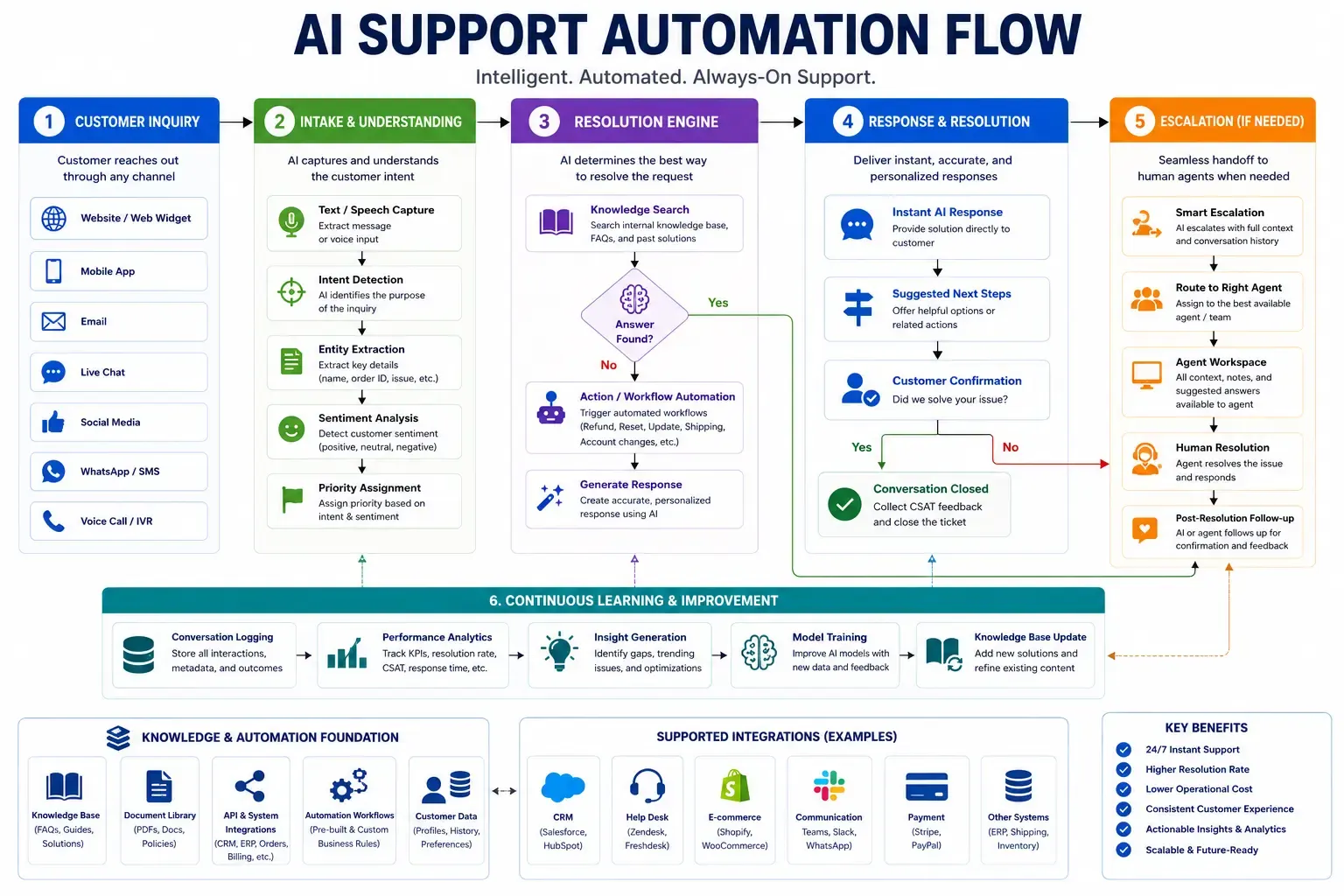
We write our position down even when it costs us work. If your knowledge base is six months out of date, the honest sequence is to fix the content first and integrate second, and we say so during discovery rather than after go-live. The wider architectural case for conversational AI, including the conditions under which it does not pay, is set out in our enterprise conversational AI guide.
Where should you start if you have one quarter and one engineer?
Weeks one and two: inventory. List every system the bot would need to reach, and for each one record the connector, the authentication model, the scope classification and the published rate ceiling on your current plan. The matrix at the top of this article is the template. Most teams find that two or three systems drop off the list at this stage, because the permission cost is not worth the use case.
Weeks three to six: the website widget and a retrieval index over your published content, with grounded citations and a working escalation path. Measure answer quality against a fixed set of real customer questions, not against a demo script.
Weeks seven to ten: one write-capable connector, chosen because it removes a measurable amount of human handling. Ticket creation or calendar booking. Not both.
Weeks eleven and twelve: the operational layer. Backoff on every connector, alerting on write failures, index freshness monitoring, a pinned model version and a documented credential inventory.
If you want that inventory done against your own stack rather than in the abstract, it is the first thing we do on a paid discovery, and it is what a working session with us covers.