An AI chatbot development service designs, builds, and maintains a conversational AI system that talks to your customers, employees, or vendors on your behalf, across your website, WhatsApp, Slack, Microsoft Teams, or a support ticketing tool. Most engagements run $8,000 to $150,000 depending on how many workflows the bot needs to handle and how deep it has to reach into your existing systems, with delivery in three to sixteen weeks. This guide breaks down what's actually included, what it costs, how long it takes, and what separates a chatbot people keep using from one that gets muted after the first week. It applies whether you're comparing chatbot development companies for a first build, or replacing a SaaS platform your team has already outgrown.
What Does an AI Chatbot Development Service Actually Cover?
A real AI chatbot development service covers six things: discovery and use-case scoping, conversation and escalation design, retrieval architecture over your own data, integration with the systems your team already uses, adversarial testing, and deployment with ongoing monitoring. A "chatbot project" that skips discovery or testing usually ships something that answers the easy questions and breaks on everything else.
At XOVO Technologies, we scope every build around the same checklist:
-
Discovery and use-case scoping: which conversations are worth automating, and which need a human every time
-
Conversation and escalation design: the actual decision logic for when the bot answers, when it asks a clarifying question, and when it hands off
-
Retrieval-augmented generation (RAG) architecture built on your documentation, product data, or support history, stored in a vector database such as Pinecone, Weaviate, Qdrant, or pgvector
-
Integration with your CRM, helpdesk, or messaging channels
-
Testing against edge cases, adversarial prompts, and multi-turn conversations, not a rehearsed demo script
-
Deployment, monitoring, and a monthly cycle of prompt and model updates
Skip any one of those and the bot either can't answer real questions or can't be trusted to answer them safely.
Most engagements involve three people on your side: someone who owns the process being automated, someone with access to the systems the bot needs to read from, and someone who can approve what the bot is allowed to say without sign-off on every response. Fewer than that and scoping drags. More than that and every review cycle adds a week.
How Much Does AI Chatbot Development Cost in 2026?
Most AI chatbot builds cost $8,000 to $150,000, depending on scope. Cost depends on how many systems the bot touches and how much of the conversation is genuinely autonomous versus scripted. Based on the projects we scope at XOVO Technologies, most chatbot development companies price in three tiers, and it's worth asking any vendor which tier they're actually quoting you for.
| Tier | What's included | Typical cost | Typical timeline |
|---|---|---|---|
| Foundational FAQ bot | Single channel, scripted flows plus one LLM for open-ended questions, no backend integration | $8,000 – $25,000 | 3–5 weeks |
| RAG-grounded assistant | Retrieval over your knowledge base or docs, one or two system integrations (CRM or helpdesk), human handoff | $25,000 – $75,000 | 6–10 weeks |
| Multi-agent enterprise chatbot | LangGraph or CrewAI orchestration, three or more integrations, human-in-the-loop escalation by default, private hosting option | $75,000 – $150,000+ | 10–16 weeks |
Two things drive most cost overruns we see: underestimating the data cleanup needed before retrieval works well, and adding integrations mid-project instead of scoping them upfront. Ask any chatbot development service for a fixed-fee quote by tier, not a per-hour estimate. Hourly quotes are where scope creep hides.
None of the tiers above include the recurring cost of model API usage or hosting, which typically runs a few hundred to a few thousand dollars a month depending on conversation volume and whether you're running a private deployment. Ask for that number separately. It's the part of the quote most first-time buyers forget to budget for.
How Long Does It Take to Build and Launch an AI Chatbot?
A RAG-grounded assistant with one or two integrations typically takes six to ten weeks from kickoff to launch. A multi-agent enterprise build with several system integrations and private hosting runs ten to sixteen weeks. The bottleneck is almost never the model. It's how clean your source data is and how many stakeholders need to sign off on the escalation rules.
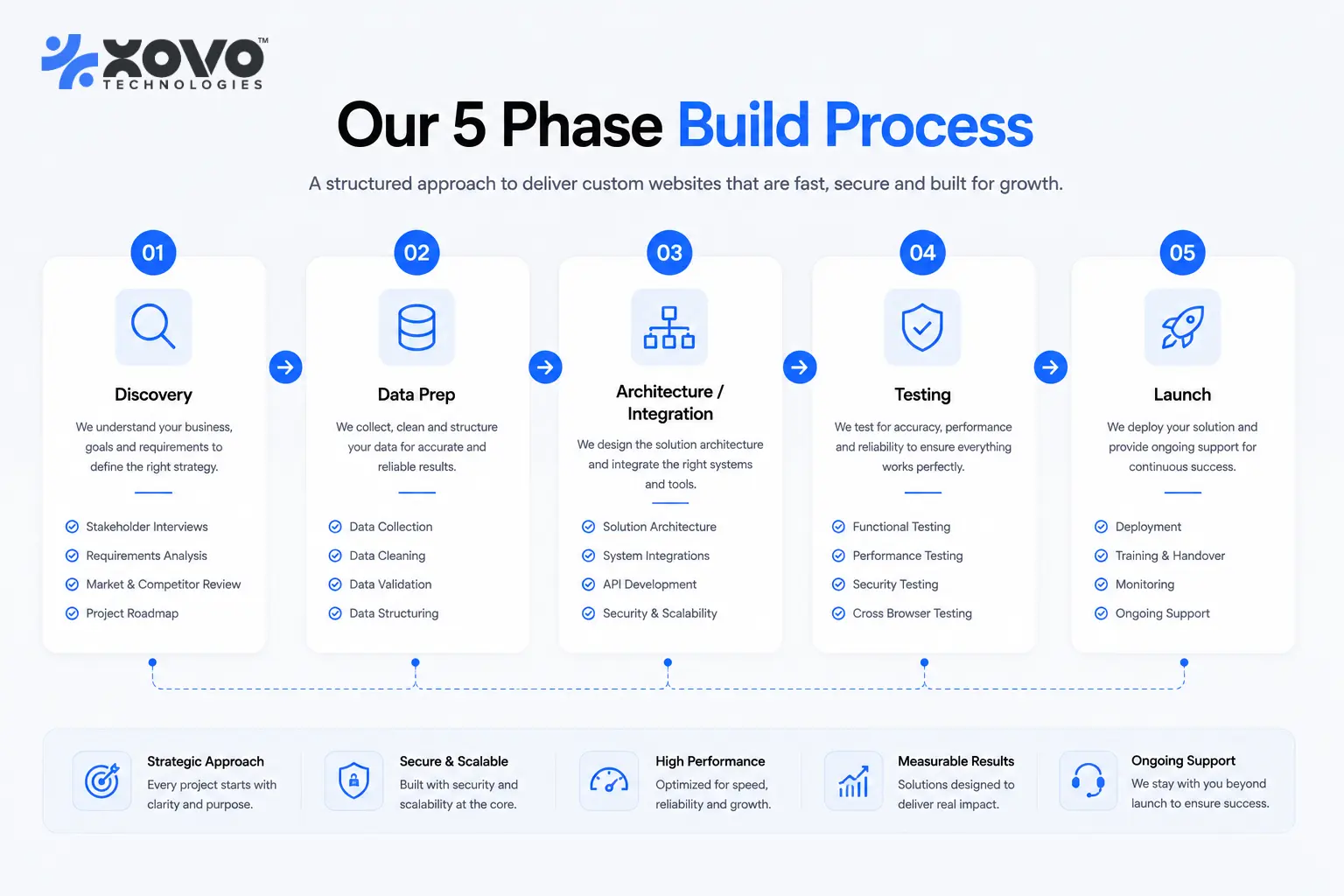
The build runs through five phases:
- Discovery and use-case scoping (one to two weeks): deciding what the bot will and won't handle
- Data and knowledge base preparation (one to two weeks, often in parallel): cleaning, chunking, and indexing the content the bot will retrieve from
- Architecture and integration build (three to six weeks): the RAG pipeline, the orchestration layer, and the connections to your CRM, helpdesk, or messaging channels
- Testing, escalation tuning, and stakeholder review (one to two weeks): running adversarial prompts and fixing the handoff logic before real customers see it
- Launch, monitoring, and the first optimization pass (ongoing): real conversations always surface gaps a test script didn't catch
Two things reliably add two to four weeks to any of the ranges above: a legal or compliance review before launch in regulated industries, and support for more than one language. Both are worth planning for upfront rather than discovering mid-build.
What Should You Look for in AI Chatbot Development Companies?
The differentiator that matters most is who owns the result. Some AI chatbot development companies build you a bot that only runs on their proprietary platform, so you rent access indefinitely. Others hand over the source code and the model weights, so the system is yours outright.
Beyond ownership, four things separate a company that can run this in production from one that can only demo it:
- Private or air-gapped hosting available for regulated data, not a shared multi-tenant cloud by default
- A real library of pre-built integrations (XOVO Technologies maintains more than 50) instead of custom connectors billed by the hour every time
- Human-in-the-loop escalation built in by default on every autonomous flow, not added after a customer complaint
- Managed MLOps and 24/7 support after launch, since a chatbot that isn't monitored drifts out of date within months
At XOVO Technologies, that scoping conversation is run jointly by our engineering team and our co-founder and CEO, Syeda Kinza Batool, whose focus is making sure the use cases we build are the ones that move a real metric, not just the ones that look good in a demo. If you want to see the actual scope document we'd produce for a build like this, our custom AI chatbot development service page walks through it.
Before signing with any vendor, ask to see one production conversation log, not a demo script. A company confident in its own work will show you a real handoff, including the times the bot got something wrong and routed to a human.
Should You Build In-House or Hire a Chatbot Development Company?
Build in-house if you already have engineers who understand RAG architecture, vector databases, and orchestration frameworks, and the chatbot is core enough to your product that you want that expertise on staff long-term. Hire a chatbot development company if you need it live in weeks instead of quarters, or if this isn't the third system your team has built this year.
We wrote a full breakdown of the hiring models businesses actually use for custom chatbot builds, contractor, in-house hire, or agency, in our guide to hiring for custom chatbot builds.
A middle option worth considering: some teams keep architecture and integration work in-house and bring in a specialist for just the RAG and orchestration layer, since that's the part with the steepest learning curve and the highest cost of getting wrong.
What Do AI-Powered Chatbot Development Services Actually Solve?
Most buyers researching AI-powered chatbot development services are trying to solve one of four problems: too many repetitive support tickets, a sales team that can't qualify leads fast enough, an internal team asking the same HR or IT questions all day, or a support queue that only scales by hiring more people.
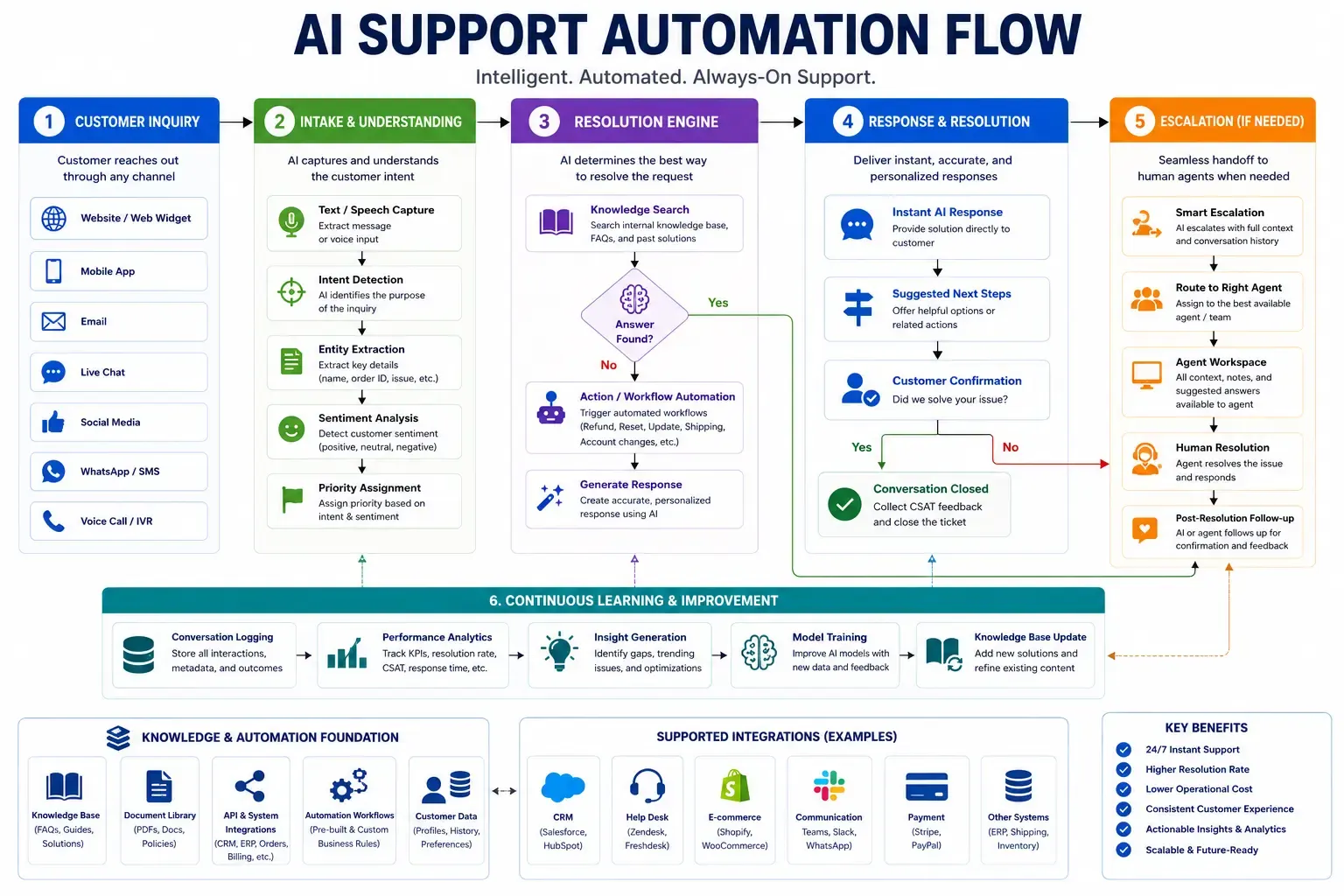
XOVO's Enterprise AI Chatbot resolves up to 80% of customer queries without a human agent, which is usually the number that justifies the build on its own. For support operations that need to route across chat, email, and voice at once instead of a single channel, our AI Support Architect product handles that multi-channel orchestration with the same human-in-the-loop escalation rules built in.
A fourth common use case doesn't touch customers at all: an internal knowledge assistant that answers employee questions about HR policy, IT procedures, or product specs by retrieving from your own internal documentation instead of a public model's training data. The same RAG architecture applies, just pointed at a different knowledge base and audience.
Which Tech Stack Do Modern AI Chatbot Development Solutions Use?
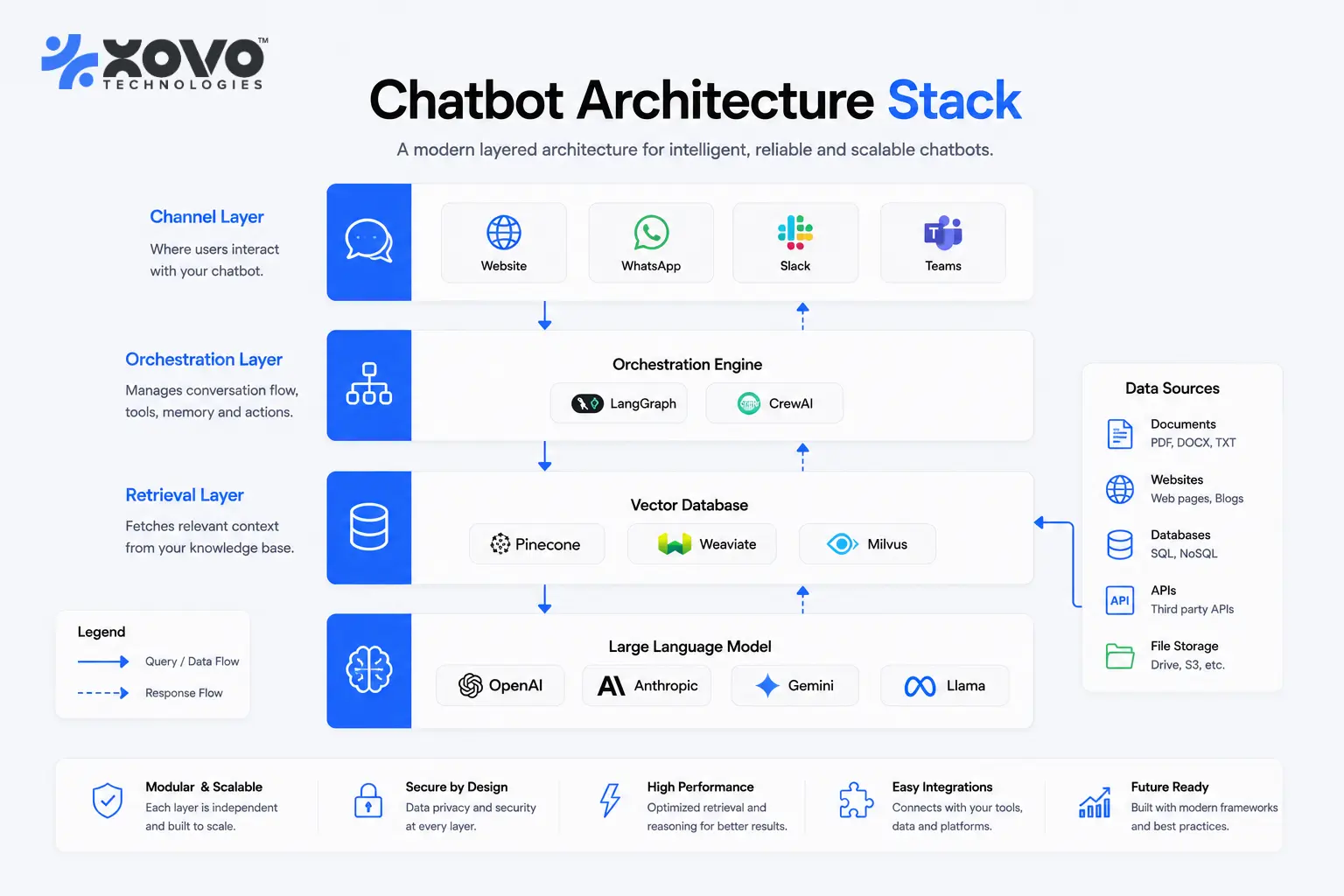
Modern chatbot development solutions combine an orchestration layer, a retrieval layer, and one or more reasoning models, usually split by task complexity rather than running everything through the single most expensive model available.
Our CTO, Sufi Inam Ul Hassan, sets the default stack for new builds at XOVO Technologies: LangGraph or CrewAI for orchestrating multi-step conversations and tool calls, the Model Context Protocol (MCP) for connecting the bot to your actual tools and data sources, and RAG over a vector database (Pinecone, Weaviate, Qdrant, or pgvector) for grounding answers in your own content instead of the model's training data. For the reasoning itself, GPT-5.5, Claude Opus 4.7, or Gemini 3.1 Pro handle complex or high-stakes conversations, while open-weight models like Llama 4 or Mistral handle high-volume, low-complexity traffic at a fraction of the cost. Regulated industries such as healthcare, finance, and government contracting usually need a private or air-gapped hosting setup so conversation data never leaves their own infrastructure. Our private LLM hosting guide covers the tradeoffs of that setup in more detail.
Model choice also drives cost directly. Routing routine questions to an open-weight model and reserving GPT-5.5, Claude Opus 4.7, or Gemini 3.1 Pro for the harder conversations can cut inference cost substantially without changing the experience a customer notices.
How Do You Keep an Autonomous Chatbot Safe and On-Brand?
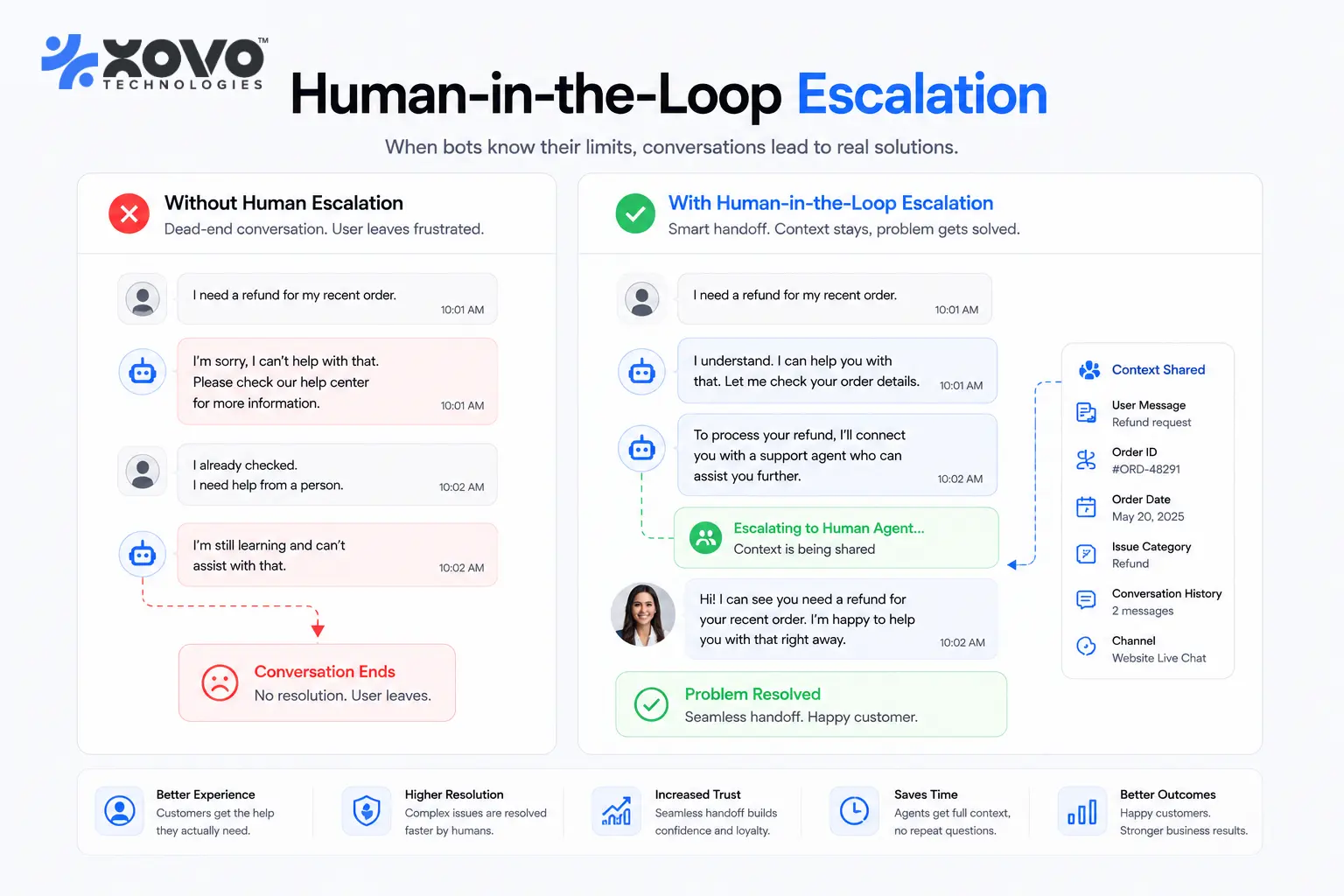
You keep it safe by making human handoff the default behavior for anything outside its confidence threshold, not an afterthought added after the first bad interaction. Every autonomous agent XOVO Technologies ships has human-in-the-loop escalation built in from day one: the bot answers what it can verify against your data, and routes anything else, including refund requests, legal questions, or anything emotionally charged, straight to a person automatically.
That same guardrail logic applies whether the system is a single chatbot or a full agentic pipeline with multiple tools and decision points. Our guide to agentic AI architecture and guardrails goes deeper into how escalation thresholds, audit logging, and approval steps get designed for higher-stakes autonomous workflows.
What Ongoing Support Should You Expect After a Chatbot Launches?
A chatbot needs monitoring and updates every month, not just a warranty period after handoff. Conversation logs need review to catch question types the original data never covered, prompts need retuning as your product or policies change, and the underlying model needs updating as new versions ship.
XOVO Technologies includes managed MLOps and 24/7 support as part of every chatbot engagement rather than selling it as a separate add-on. That covers uptime monitoring, monthly review of conversation logs to catch drift, prompt and retrieval updates when your documentation changes, and a direct line to the engineering team if something breaks outside business hours. Ask any chatbot development company you're evaluating exactly what happens in month two: who reviews the logs, how fast escalations get triaged, and whether model or prompt updates are included in the retainer or billed separately.
Most teams track three numbers after launch: the percentage of conversations the bot resolves without escalation, the percentage that get routed to a human and how quickly, and customer satisfaction on the resolved conversations. If deflection climbs while satisfaction drops, the bot is answering too confidently instead of escalating when it should.
How Does a Chatbot Connect to Your Website, CRM, and Support Tools?
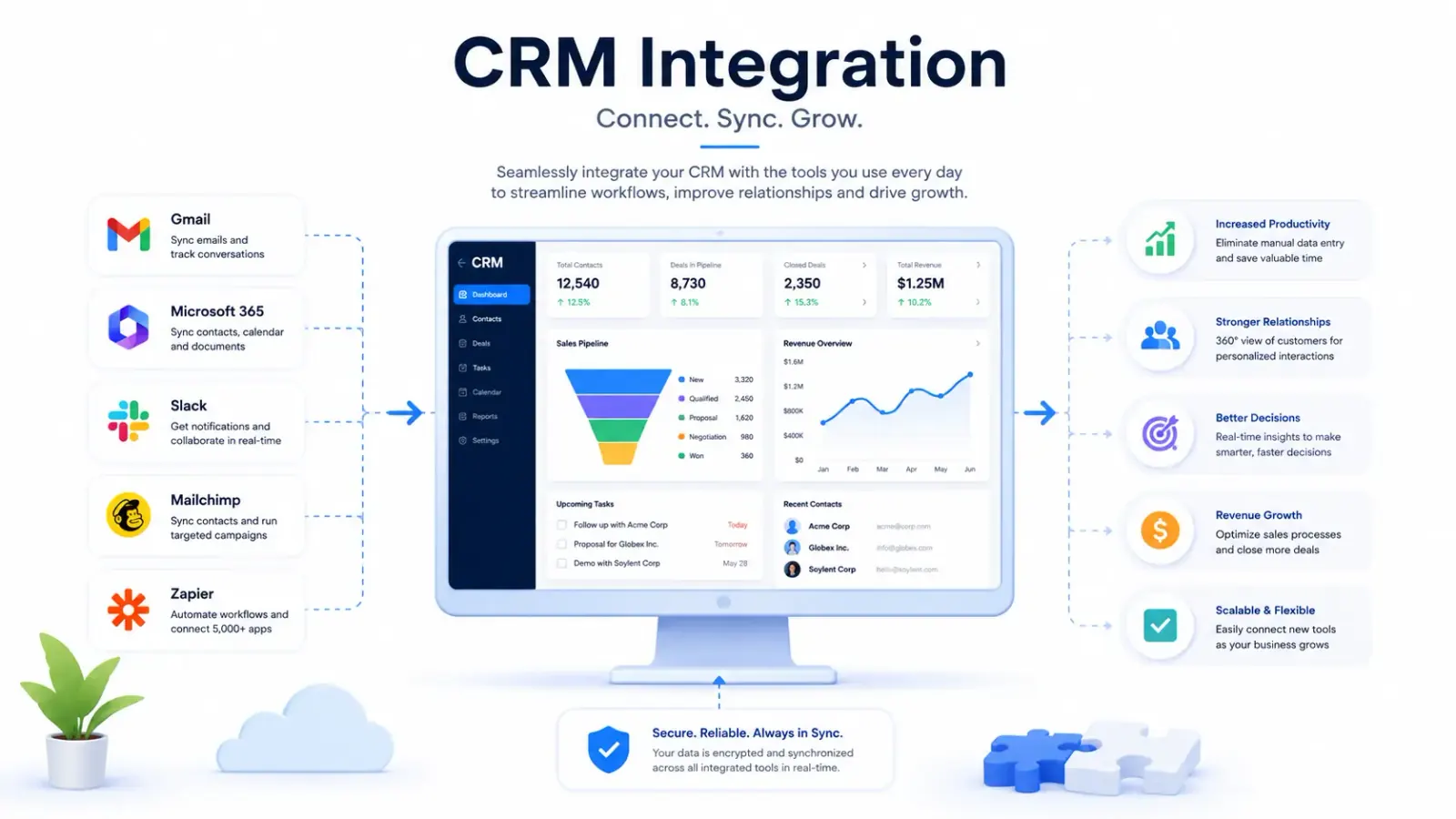
It connects through pre-built integrations where they exist, and a custom API connector where they don't. A chatbot that can't see your CRM data, your helpdesk tickets, or your order history can only answer generic questions, which is why integration work usually takes longer than the conversation design itself.
Our Custom AI Chatbot Development service handles this end to end: connecting the bot to your website, Google Workspace or Microsoft 365, your CRM, and your existing support stack, so a handoff to a human agent carries full conversation context instead of starting over. If you're specifically trying to connect a chatbot to your website and Google apps stack, our chatbot integration guide walks through the connection patterns in more detail.
If you want a real scope, cost, and timeline for your own chatbot build instead of a generic range, book a free AI audit and we'll map it out against your actual systems and data in one working session.